




After Arrival in Japan: Buses, Trains & Taxis


Bus
Airport Limousine

Purchase Airport Limousine Bus digital tickets for optimal airport access, connecting Haneda/Narita to major Tokyo terminals/hotels. Purchase or modify your ticket from one month before up to 5 minutes prior to departure.
From here, you will be redirected to a website outside of Japan.

Train (HANEDA Airport)
Tokyo Monorail

Purchase your digital one-way ticket online from Haneda Airport to Hamamatsucho Station. Connect to JR lines from Hamamatsucho.
From here, you will be redirected to a website outside of Japan.
KEIKYU Hanetoku Ticket & Tokyo Subway Ticket

Purchase this cheap ticket set and get a KEIKYU Hanetoku Ticket (a round-trip ticket for travel from Haneda Airport Terminal 1, 2 or Terminal 3 Station to Sengakuji Station) and Tokyo Subway Ticket (a special passenger ticket for unlimited travel on all Tokyo Metro and Toei Subway lines).
- * The Tokyo Subway Ticket is valid for a period of 24 hours, 48 hours, or 72 hours from the usage start time (i.e., the time you pass through the first set of ticket gates). The applicable validity period can be confirmed on the reverse side of your ticket.
- * For information on the stations at which you can board and disembark trains, please see the map for the Tokyo Metro and Toei Subway lines. This ticket cannot be used for travel on any of the JR lines.
From here, you will be redirected to a website outside of Japan.
JR EAST PASS (NAGANO/NIIGATA AREA) -Consecutive 5 days-
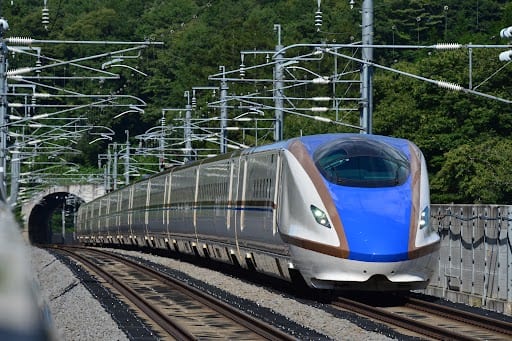
The JR EAST PASS (Nagano, Niigata area) allows unlimited rides within its designated JR East lines for 5 consecutive days. Exclusive to non-Japanese passport holders.
From here, you will be redirected to a website outside of Japan.
JR EAST PASS (TOHOKU AREA) -Consecutive 5 days-
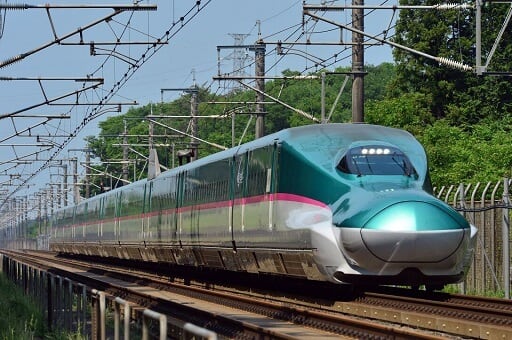
The JR EAST PASS (Tohoku area) allows unlimited rides within its designated JR East lines for 5 consecutive days. Exclusive to non-Japanese passport holders.
From here, you will be redirected to a website outside of Japan.
Train (NARITA Airport)
Keisei Skyliner

Purchase Keisei Skyliner tickets: Narita Airport to Ueno/Nippori for easy Tokyo transfers. Enjoy Travel CUBE discounts and seamless, counter-free boarding via AI Face Check-in Go.
From here, you will be redirected to a website outside of Japan.
Train (KANSAI Airport)
NANKAI (Digital Limited Express Rapi:t Tickets)
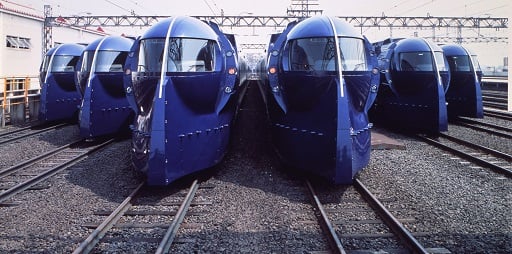
Rapi:t Digital Ticket: The fastest, most affordable way between Kansai Airport and Osaka. Book seats on your smartphone and ride seamlessly with a QR ticket. Purchase by the day before travel.
From here, you will be redirected to a website outside of Japan.
Taxi
Eastern Airport Motors Co., Ltd. (Airport Transfer Hire)

Book your fixed-fare airport transfer private car service
[Eligible Flights]
Flights departing from and arriving at Haneda, Narita, Kansai, Itami, Kobe, Chubu International, New Chitose, and Naha Airport
[Booking Period]
- For Haneda and Narita Airport users, reservations are accepted up to 2 days before the date of use.
- For Kansai, Itami, Kobe, Chubu Centrair, New Chitose, and Naha Airport users, reservations are accepted up to 4 days before the date of use.
From here, you will be redirected to a website outside of Japan.
MK Taxi (Airport transfer Taxi)

You can reserve a taxi transfer between your home/hotel or designated location and the airport for a fixed fee from Travel CUBE.
Reservations can be made at metered rates outside of the target areas.
Eligible Flights
Airport transfer Taxi
Flights departing from and arriving at Haneda, Narita, Kansai, Itami, Kobe, Chubu International, New Chitose, Fukuoka and Naha(Okinawa)
- * In some areas, fares are metered instead of a fixed fee . Please check the MK Taxi website for details when making your reservation.
Booking Period
For Haneda and Narita Airport users, reservations are accepted until 24 hours before the date and time of use.
For Itami, Kansai, Kobe, Fukuoka, New Chitose, Naha (Okinawa) and Chubu Centrair International Airport users, reservations are accepted until 17:00 on the day before use.
Mileage
Earn 1 mile for every JPY 200 (including tax) spent by reserving and using this service via Travel CUBE.
- * Fares such as expressway tolls, date and time designated fees, vehicle type designated fees, foreign language driver designated fees are not eligible for mileage accrual.
From here, you will be redirected to a website outside of Japan.
A great-value sightseeing pass for exploring multiple destinations


Local Airport Taxi in Japan

- With this trustworthy and convenient Airport Transfer Reservation , you can easily reserve a vehicle to/from the airport on this page.
- If your flight is delayed or canceled, you will not need to pay any waiting charges or cancellation charges for not being able use the service.
Service Overview
This service offers a seamless travel experience by integrating up-to-date flight status information and location information such as the terminal, boarding gate and security checkpoint with transit planner search services to provide you with comprehensive route information for your entire journey. This covers getting to the departure airport and onto your flight, as well as traveling onward to your final destination after disembarkation. Thanks to our partnerships with ground transportation providers*1, you can also reserve and purchase tickets for getting to your departure airport*2.
- * Airport access searches are not available for airports outside Japan.
-
*1.We are gradually expanding our partnerships with ground transportation providers.
-
*2.Some products can be reserved/purchased in Travel CUBE, and some must be reserved on the ground transportation provider’s website.
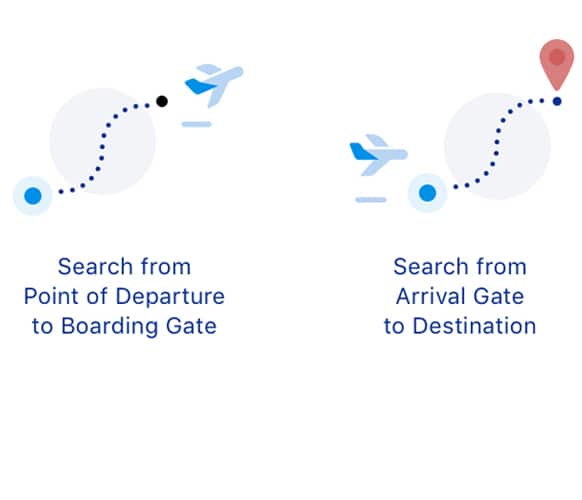
How to Use This Service
After booking your ANA ticket, go to the official ANA app home screen or the Reservation Details screen on the ANA website, and then go to the Airport Access page. Enter your start point and destination, and search how to get to the airport.
- * All images are for illustrative purposes only.
Using the Service on the ANA Website
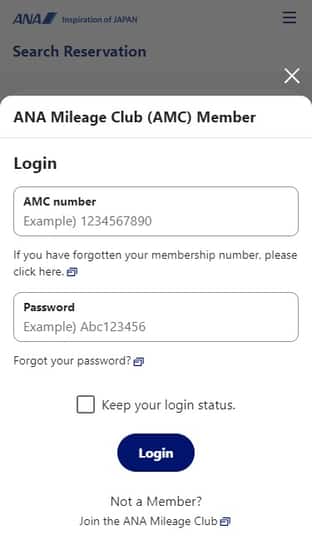
STEP 1 Login Screen
Log in via the View Reservation page on the ANA website.
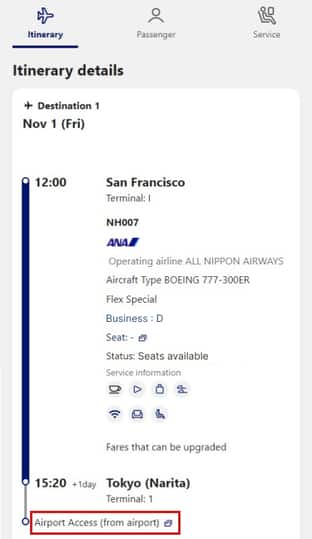
STEP 2 Flight Ticket Reservation Details Screen
Click on the "Airport Access" link
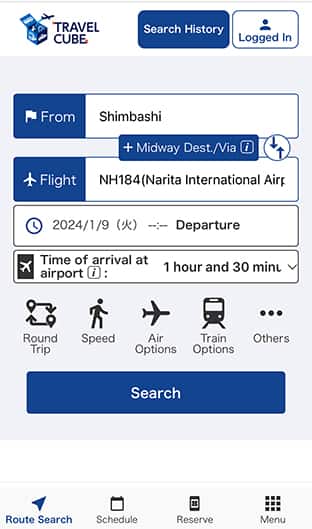
STEP 3 Airport Access Search conditions selection screen
Enter your start point and time of arrival at the airport, and click Search.
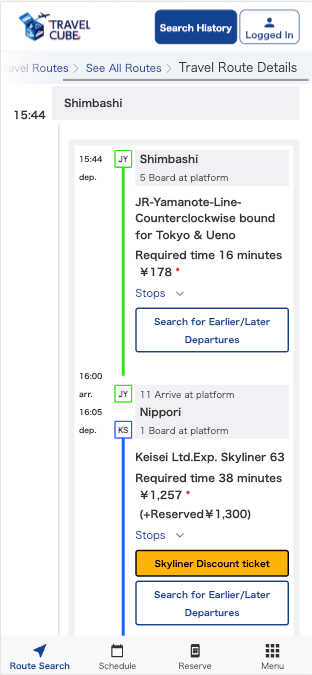
STEP 4 Airport Access Search results screen
On this screen, you can confirm information for your flight such as how to get to the airport, the terminal, and the boarding gate.
- * For further details, please see Airport Access Search results screen.
Using the Service on the Official ANA App
Search for Route upon Departure
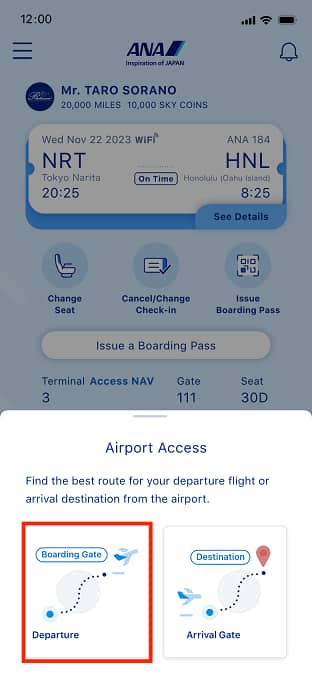
STEP 1 Official ANA App
Select Airport Access from the official ANA app home screen.
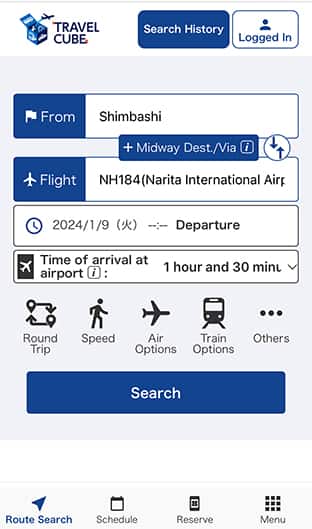
STEP 2 Airport Access Search conditions selection screen
Enter your start point and time of arrival at the airport, and click Search.
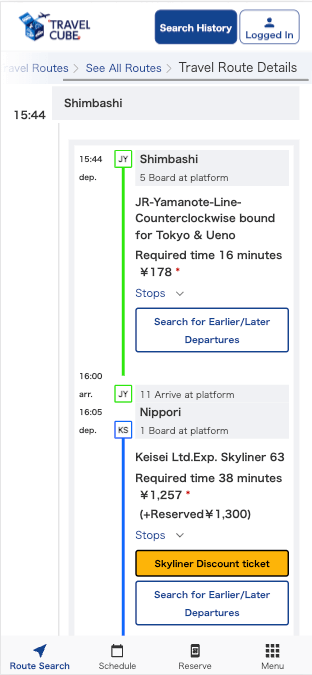
STEP 3 Airport Access Search results screen
On this screen, you can confirm information for your flight such as how to get to the airport, the terminal, and the boarding gate.
- * For further details, please see Airport Access Search Results Screen.
Search for Route upon Arrival
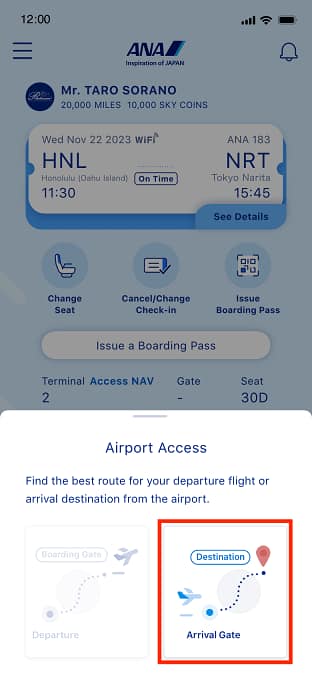
STEP 1 Official ANA App
Select Airport Access from the official ANA app home screen.
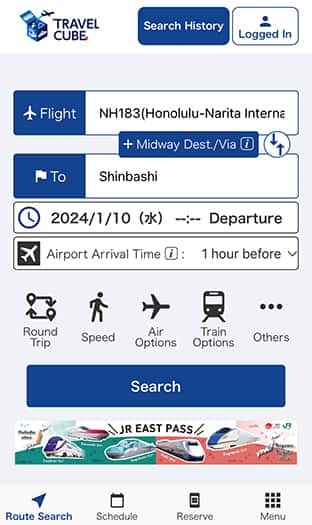
STEP 2 Airport Access Search conditions selection screen
Enter your destination and click Search.
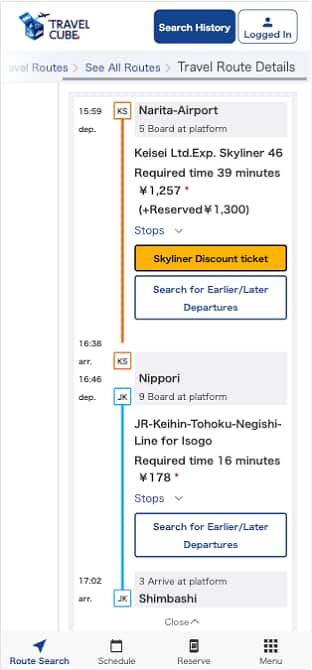
STEP 3 Airport Access Search results screen
On this screen, you can confirm your flight's scheduled departure time and route information all the way up to your destination.
Airport Access Search Results Screen
As well as information on how to travel to/from the airport in keeping with the scheduled departure/arrival time of your reserved flight, you can also confirm information such as the terminal, security checkpoint, airport map, boarding gate number, and flight status.
- * The information available will differ depending on your flight. Please also note that this information will only be available during certain times.
Japan Domestic Flight
Departures
Applicable Period: From 1 day prior to 1 day after departure
Available Information: Flight status, security checkpoint information*3, terminal information*3, boarding gate, airport map
-
*3.Only available for certain airports.
Arrivals
Applicable Period: From 1 day prior to 1 day after departure
Available Information: Flight status, exit information*4, airport map
-
*4.Only available for Haneda and Fukuoka airports.
International Flight
Flights Departing from Japan
Applicable Period: From 28 days before to the day after boarding
Available Information: Flight status, terminal information*5, airport map
-
*5.Only available for airports in Japan.
Flights Arriving in Japan
Applicable Period: From 28 days before to the day after boarding
Available Information: Flight status, terminal information*6, airport map
-
*6.Only available for airports in Japan.
- * For arrivals at Haneda Airport, this is only available from 24 hours prior to the scheduled departure time (local time). Confirmed terminal information will be provided once again 2 hours before the arrival of your flight, as terminals are subject to change due to flight status on the day.

- * Route information provided by: Ekispert
- * Railway Service Status: You can also check the status of railway services to see if there are any delays or similar disruptions.
Railway service status provided by: Rescue Now Co., Ltd.
System Requirements
PC
Windows (excluding Windows RT)
Latest version of Google Chrome, Latest version of Microsoft Edge
Macintosh
Latest version of Google Chrome
Smartphone/Tablet
iOS
Latest version of Safari
Android
Latest version of Google Chrome
- Even if your device fulfils the relevant system requirements, some pages may be displayed incorrectly and certain functions may be unavailable for reasons such as your combination of browser and OS. (This also includes the use of some add-ons and beta, preview, or other such browser versions.)
- Although we are always looking into how we can make our website compatible with new browsers, there may be occasions when pages will not display or function correctly due to unique issues with browsers that are yet to be officially released.
Coming soon