




Information when entering your name when making reservations
For international travel, the name on Travel Document (eg. passport) must match the name on the ticket. Failure to provide proper documentation will prevent the passenger from boarding their flight. When making a reservation, please enter your name exactly as it appears on your passport.
Passport Sample and Example for inputting names
Example 1
No middle name
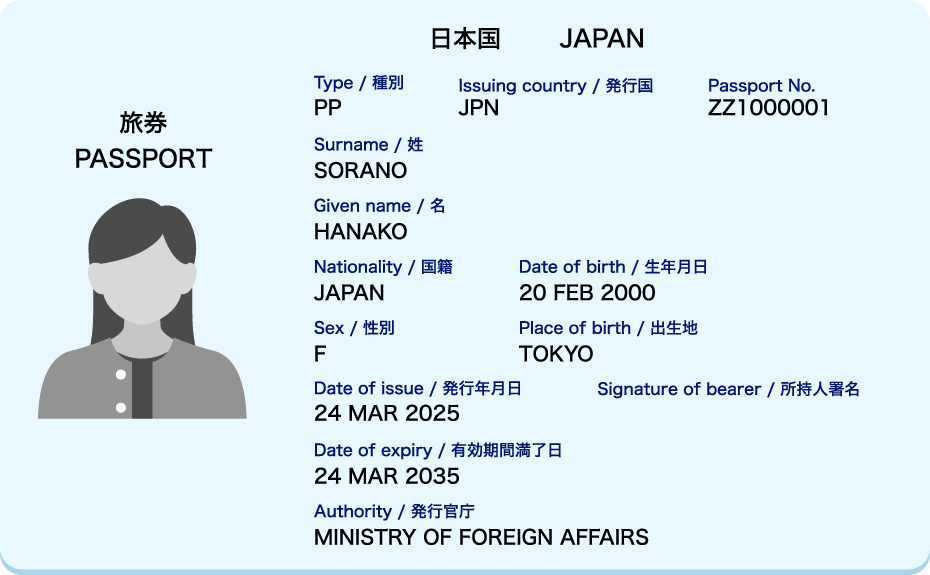
(Input)
Last(Family) name : SORANO
First(Given) name : HANAKO
Middle name : blank
Example 2
Has a middle name, but no middle name field on passport
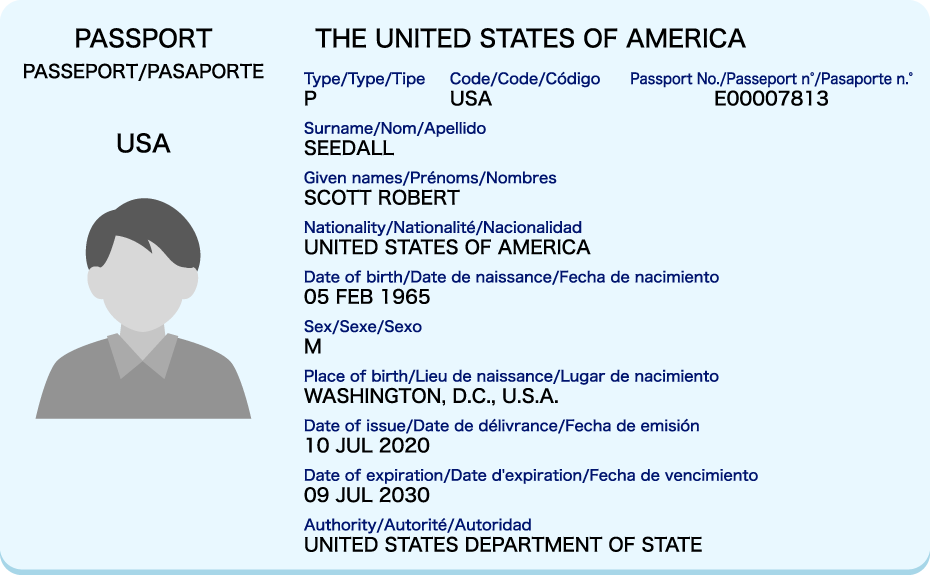
(Input)
Last(Family) name : SEEDALL
First(Given) name : SCOTT ROBERT
Middle name : blank
* Even if you have a middle name and your passport does not have a middle name field, please enter it in the First(Given)name field.
Example 3
Middle name field included on passport
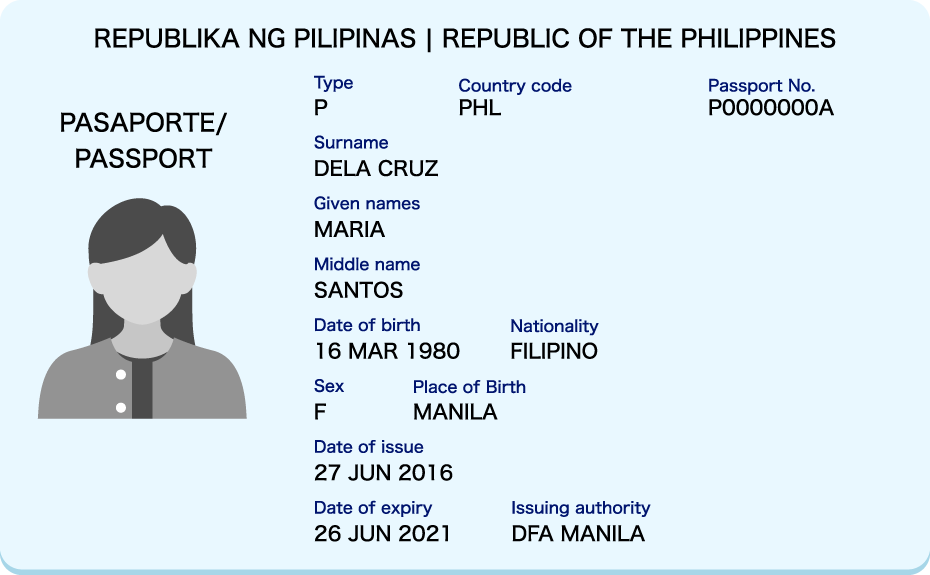
(Input)
Last(Family) name : DELACRUZ
First(Given) name : MARIA
Middle name : SANTOS
* Please enter your middle name in the Middle name field only if your passport has a middle name field.
Example 4
Title included on passport
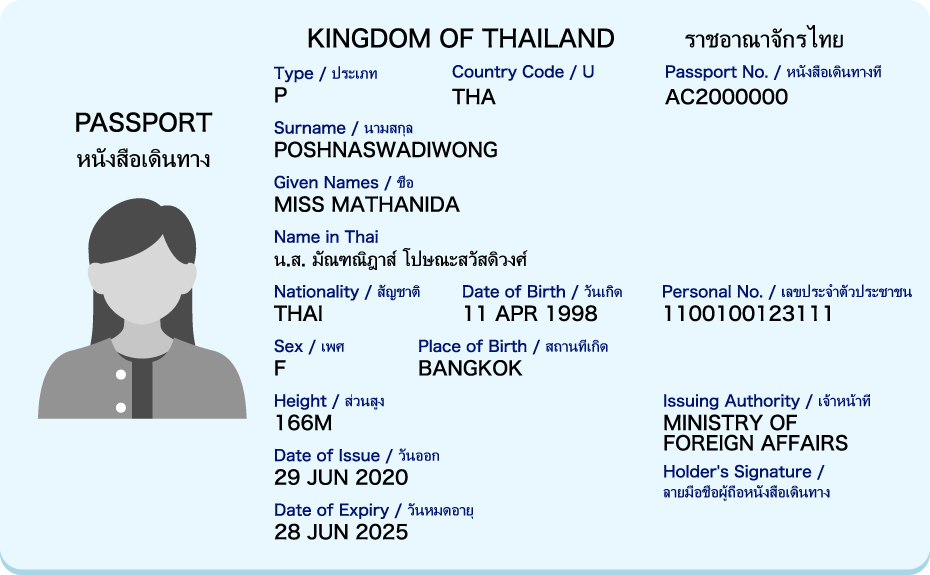
(Input)
Last(Family) name : POSHNASWADIWONG
First(Given) name : MATHANIDA
Middle name : blank
* Although your passport will have a title listed, you do not need to enter it in the Last (Family) or First (Given) Name fields.
Frequently Encountered Problems
Your last name has changed through marriage or for another reason
- If you are using a passport in your former name, please enter your former name.
- If you are using a passport in your new name, please enter your new name.
- If the new and former family names are listed on your travel document, please remove the name in parentheses before entering it.
Your passport contains names in parentheses
- Please remove the name in parentheses
- Example 1
Name on Passport : TAKAHASHI ARIN (ALENE)
(Input)
LAST(Family) name : TAKAHASHI
First(Given) name : ARIN - Example 2
Name on Passport : JOSÉ (MANUEL) MARTÍNEZ PÉREZ
(Input)
LAST(Family) name : MARTINEZ PEREZ
First(Given) name : JOSE - Example 3
Name on Passport : TAKAHASHI EMI (PASCALE)
(Input)
LAST(Family) name : TAKAHASHI
First(Given) name : EMI - Example 4
Name on Passport : SUZUKI (SMITH) HANAKO
(Input)
LAST(Family) name : SUZUKI
First(Given) name : HANAKO - Example 5
Name on Passport : GAIMU (TANAKA) HANAKO
(Input)
LAST(Family) name : GAIMU
First(Given) name : HANAKO
- Example 1
You have a long name
- Up to 48 characters can be entered for first and last names combined. (The total number of characters for the first name and the middle name combined must be 25 or fewer.)
- Example 1
Name on Passport : WARNAKULASOORIYA ASHAN PARBATH DINESHKA
(Input)
LAST(Family) name : WARNAKULASOORIYA
First(Given) name : ASHANPARBATHDINESHKA
- Example 1
- If the name exceeds 48 characters, please contact ANA.
Last name is one character
- 2 or more characters must be entered for a last name. If your last name is only one character, please enter it again.
- Example 1
Name on Passport : A TARO
(Input)
LAST(Family) name : AA
First(Given) name : TARO
- Example 1
You have multiple first and/or last names
- Please enter each of your names into the relevant field without spaces or hyphens.
- Example 1
Name on Passport : GOMEZ GONZALES MARIA
(Input)
LAST(Family) name : GOMEZGONZALES
First(Given) name : MARIA
- Example 1
Hyphens, periods, spaces, etc. are included
- If your name contains hyphens, periods, etc., please delete them or replace them with spaces.
- If your name contains spaces, you can also delete them.
- Example 1
Name on Passport : WANG WEI-JHE
(Input)
LAST(Family) name : WANG
First(Given) name : WEIJHE
or
LAST(Family) name : WANG
First(Given) name : WEI JHE - Example 2
Name on Passport : JAMES ROBERT BRYCE-BUCHANAN
(Input)
LAST(Family) name : BRYCEBUCHANAN
First(Given) name : JAMESROBERT
or
LAST(Family) name : BRYCEBUCHANAN
First(Given) name : JAMES ROBERT
- Example 1
JR (Junior), SR (Senior), Ⅲ, etc. are included
- If your name includes JR, SR, Ⅲ, etc., please enter it after your last name.
- Example 1
Name on Passport : WILLIAM LOONEY III
(Input)
LAST(Family) name : LOONEYIII
First(Given) name : WILLIAM
- Example 1
- It must match the name on your passport. Please check for yourself.
Either the first or last name is missing
- If either your first or last name is missing, please contact ANA by telephone.
It contains an umlaut character
- Please replace it as follows and enter it.
- Ä = AE
- Ö = OE
- Ü = UE
- Example 1
Name on Passport : Müller Jörg
(Input)
LAST(Family) name : MUELLER
First(Given) name : JOERG
- The symbol "=" indicates the replace.
Other notes
If the above conditions do not apply, please contact ANA by telephone.
If there is a discrepancy between the name on your passport and the name on your airline ticket, you may be questioned about the discrepancy at immigration.
In that case, you will need to explain the discrepancy yourself.
Furthermore, ANA will not be responsible for any expenses that may arise due to this.
When the name printed on the ANA Mileage Club card and the name of the passport are different
- Please make necessary arrangements so that two names match prior to making a reservation.
- Please edit or change the name on your card through the ANA Mileage Club Service Center.
- If you don't have the passport, please make necessary arrangements so that the AMC Memberr's name in English matches to the name on the boarding ticket prior to making a reservation.
- If the name on the boarding ticket does not match the AMC member's name in English, it may not be possible to add the customer number to the reservation or accrue miles.
Name Correction on the Ticket
The tickets cannot be changed or transferrerd to another customer.
In case the same passenger but there is an error in the name on the ticket
For customers using ANA tickets (205 tickets) only on ANA flights (flights operated by ANA), we will accept the following corrections.
- Correction of spelling, initial, title of the name
- When the first name and the family name are in the wrong order
- Middle name addition or deletion
- Last (Family) name change due to marriage and divorce
If you purchased a ticket directly from ANA, please contact ANA by telephone. If you purchased a ticket through a travel agency or another airline other than ANA, please contact travel agency or airlines where you have purchased.
If none of the above applies
Customers who do not meet the above conditions may need to make a new reservation and purchase a new ticket. Please contact ANA by telephone.
If you purchased a ticket through a travel agency or another airline other than ANA, please contact travel agency or airlines where you have purchased.