


Welcome to ANA STORE@SKY An online shopping service that can be accessed via ANA Wi-Fi on board flights and in ANA Lounges Purchase items listed in ANA SKY SHOP and ANA-exclusive products A shopping service available exclusively to passengers

Welcome to ANA STORE@SKY An online shopping service that can be accessed via ANA Wi-Fi on board Japan domestic flights and in Japan domestic ANA Lounges(*)

A new way to enjoy in-flight shopping! Purchase items listed in ANA SKY SHOP and ANA-exclusive products! *Also available in some international lounges.

Benefits of ANA STORE@SKY

Benefit 1 An array of exclusive products and special deals!

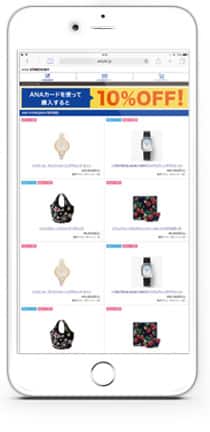
Access the ANA STORE@SKY via the ANA Wi-Fi on board the flight or in an ANA Lounge to purchase products listed in the ANA SKY SHOP and ANA-exclusive products.
ANA STORE@SKY is only available in Japanese and delivery is only available within Japan.
Click here for ANA SKY SHOP

*A standard packing and shipping fee of 770 yen (tax included) will be charged per delivery address.
*Depending on the size of the package, a large package shipping fee of 1,430 yen / 2,750 yen (tax included) may be charged for some products. (Excluding Okinawa and remote island regions)
*If the products are shipped from different warehouses, a packing and shipping fee will be charged for each shipping source.
*Delivery is only available within Japan.
*Some products have free shipping.

Benefit 1

An array of exclusive products and special deals!

Access the ANA STORE@SKY via the ANA Wi-Fi on board the flight or in an ANA Lounge to purchase products listed in the ANA SKY SHOP and ANA-exclusive products.
ANA STORE@SKY is only available in Japanese and delivery is only available within Japan.
Click here for ANA SKY SHOP

*A standard packing and shipping fee of 770 yen (tax included) will be charged per delivery address.
*Depending on the size of the package, a large package shipping fee of 1,430 yen / 2,750 yen (tax included) may be charged for some products. (Excluding Okinawa and remote island regions)
*If the products are shipped from different warehouses, a packing and shipping fee will be charged for each shipping source.
*Delivery is only available within Japan.
*Some products have free shipping.
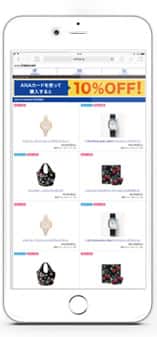

Take your pick from a large range of ANA-exclusive products that are available only on ANA STORE@SKY.

Take your pick from a large range of ANA-exclusive products that are available only on ANA STORE@SKY.

Benefit 2 Earn 1 mile per JYP100 you spent.

To earn miles,you need to register as the ANA Mileage Club membership.
Click here for New Membership Registration
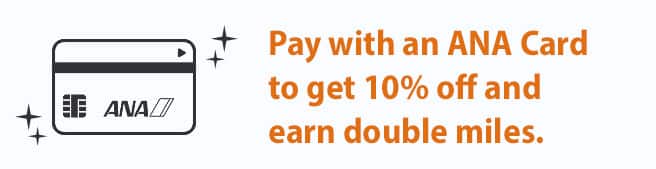

Pay with an ANA Card to get 10% off and earn double miles.

Benefit 3 Use your miles directly toward purchases!

Use the miles you have earned directly toward purchases, with 1 mile being equivalent to JPY 1.
Please note that you can use various payment methods in conjunction with the use of miles.
*When using miles in conjunction, a 10% discount will be applied to the amount paid with your ANA card after deducting the amount paid with miles.
*Digital coupons issued by ANA cannot be used.

Handling for Miles upon Refund

Please note that, if you use miles to purchase a product but then decide to return it, your miles will be returned to you in the form of ANA Shopping Points (not miles). Please note that if the expiration date has passed at the time of processing, the miles will automatically expire and a refund will not be possible. If you cancel or return some items when ordering multiple products, the miles used will be recalculated for the remaining items. The rules for mile refunds and redemption, and the handling of expiration dates, are based on our company's regulations.

Benefit 4 Perform the service usage settings on board your flight or in the ANA Lounge and shop from the comfort of your home after your flight!

If you perform the service usage settings in advance on board your flight or in the ANA Lounge, you will be able to access the ANA STORE@SKY from the ground as well for two days after your flight. This makes the ANA STORE@SKY perfect for those who want to take their time shopping after returning home.
*After disembarking from the aircraft, AMC members subscribing to the e-mail magazine will receive an e-mail with instructions on how to use the service on the ground. It may not be possible depending on the operation status.
*ANA STORE@SKY does not accept online payments for ANA "Diamond Service" domestic and international in-flight sales coupons or ANA travel vouchers. For customers who wish to pay with gift certificates, we have application postcards and envelopes for sending gift certificates.
*Some products are not eligible for payment with gift certificates. We appreciate your understanding.
*Please ask a cabin crew member for an application postcard or envelope for sending gift certificates when you board your flight.
*ANA gift cards and ANA FESTA coupons cannot be used for payment when ordering by postcard.


Benefit 2

Earn 1 mile per JYP100 you spent.

Pay with an ANA card to get 10% off and earn double miles.

To earn miles,you need to register as the ANA Mileage Club membership.
Click here for New Membership Registration

Pay with an ANA Card to get 10% off and earn double miles.

Benefit 3

Use your miles directly toward purchases!

Use the miles you have earned directly toward purchases, with 1 mile being equivalent to JPY 1.
Please note that you can use various payment methods in conjunction with the use of miles.
*When using miles in conjunction, a 10% discount will be applied to the amount paid with your ANA card after deducting the amount paid with miles.
*Digital coupons issued by ANA cannot be used.

Handling for Miles upon Refund

Please note that, if you use miles to purchase a product but then decide to return it, your miles will be returned to you in the form of ANA Shopping Points (not miles). Please note that if the expiration date has passed at the time of processing, the miles will automatically expire and a refund will not be possible. If you cancel or return some items when ordering multiple products, the miles used will be recalculated for the remaining items. The rules for mile refunds and redemption, and the handling of expiration dates, are based on our company's regulations.

Benefit 4

Perform the service usage settings on board your flight or in the ANA Lounge and shop from the comfort of your home after your flight!

If you perform the service usage settings in advance on board your flight or in the ANA Lounge, you will be able to access the ANA STORE@SKY from the ground as well for two days after your flight.
This makes the ANA STORE@SKY perfect for those who want to take their time shopping after returning home.
*After disembarking from the aircraft, AMC members subscribing to the e-mail magazine will receive an e-mail with instructions on how to use the service on the ground.
It may not be possible depending on the operation status.
*ANA STORE@SKY does not accept online payments for ANA "Diamond Service" domestic and international in-flight sales coupons or ANA travel vouchers. For customers who wish to pay with gift certificates, we have application postcards and envelopes for sending gift certificates.
*Some products are not eligible for payment with gift certificates. We appreciate your understanding.
*Please ask a cabin crew member for an application postcard or envelope for sending gift certificates when you board your flight.
*ANA gift cards and ANA FESTA coupons cannot be used for payment when ordering by postcard.

Don't forget to prepare before boarding so that you can enjoy shopping on the ANA STORE@SKY!

Notes

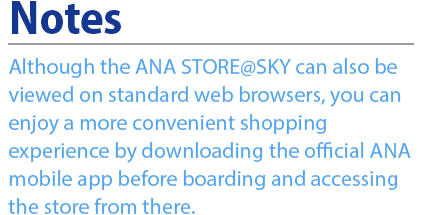
Although the ANA STORE@SKY can also be viewed on standard web browsers, you can enjoy a more convenient shopping experience by downloading the official ANA mobile app before boarding and accessing the store from there.

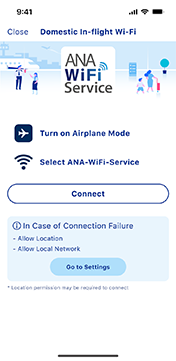
Before launching the app . . . Turn Airplane Mode on Turn Wi-Fi on Select the SSID [ANA-WiFi-Service] wireless network

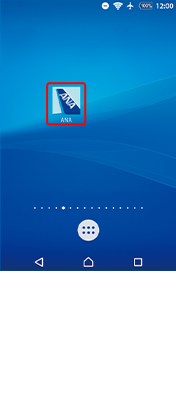
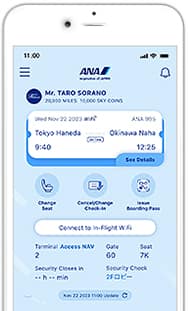
1 Select the ANA app

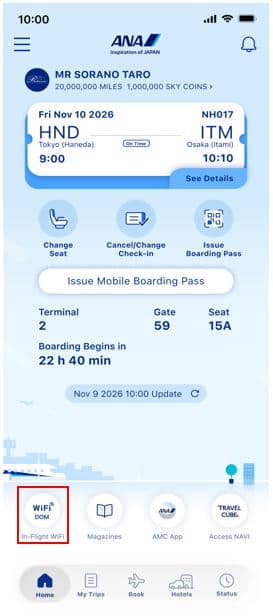
2 Launch the ANA app and Tap on WiFi DOM

3 Tap on the Connect button

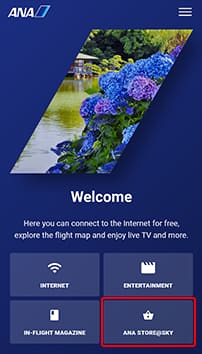
4 Tap on ANA STORE@SKY on the portal site

*The design of the portal screen may vary depending on the device.

5 Enjoy shopping on the ANA STORE@SKY

To shop after your flight, you will need to perform the service usage settings in advance on board your flight. ① Click on the button at the top of the product page ② Set your email address and password ③ Access the URL sent to your email address to be able to enjoy shopping on the ANA STORE@SKY from the ground as well *The portal screen design will vary by aircraft. *This service is not available on some aircraft. *Images are for illustrative purposes only.

*If you download the ANA app before boarding, you will be able to use all the contents more conveniently.

*If you were unable to connect to the ANA Wi-Fi on board your flight or wish to use the ANA STORE@SKY on board an aircraft on which it is not available, please contact A-style Customer Support Desk. Please note that orders cannot be placed by phone.

*This service uses a wireless LAN. Therefore, there is a possibility of your communications being intercepted or your device being accessed by an unauthorized third party, as there is when using other public Wi-Fi spots.
We strongly recommend that customers take security measures, including installing firewalls and security software on their devices, before using this service.

*The ANA STORE@SKY is not available on codeshare flights operated by other airlines, but customers flying on such flights will be able to access the service when using an ANA Lounge.

*This service is also available in some international ANA lounges (Haneda, Narita, Honolulu).

Inquiries by phone (Only in Japanese)Contact (A-style Customer Support Desk)0120-257-150 Operator hours: Monday-Friday: 09:00-18:00; Weekends, national holidays, December 30-31: 09:00-17:00
(Closed from January 1st to January 3rd for the New Year holidays)
*Please note that reception hours may change depending on the situation.
*When contacting the A-style Customer Support Desk, please follow the voice guidance and press 1.

Don't forget to prepare before boarding so that you can enjoy shopping on the ANA STORE@SKY!

Before launching the app . . . Turn Airplane Mode on Turn Wi-Fi on Select the SSID [ANA-WiFi-Service] wireless network

1 Select the ANA app

2 Launch the ANA app and Tap on WiFi DOM

3 Tap on the Connect button

4 Tap on ANA STORE@SKY on the portal site

*The design of the portal screen may vary depending on the device.

5 Enjoy shopping on the ANA STORE@SKY

To shop after your flight, you will need to perform the service usage settings in advance on board your flight. ① Click on the button at the top of the product page ② Set your email address and password ③ Access the URL sent to your email address to be able to enjoy shopping on the ANA STORE@SKY from the ground as well *The portal screen design will vary by aircraft. *This service is not available on some aircraft. *Images are for illustrative purposes only.

*If you download the ANA app before boarding, you will be able to use all the contents more conveniently.

*If you were unable to connect to the ANA Wi-Fi on board your flight or wish to use the ANA STORE@SKY on board an aircraft on which it is not available, please contact A-style Customer Support Desk.
Please note that orders cannot be placed by phone.

*This service uses a wireless LAN. Therefore, there is a possibility of your communications being intercepted or your device being accessed by an unauthorized third party, as there is when using other public Wi-Fi spots.
We strongly recommend that customers take security measures, including installing firewalls and security software on their devices, before using this service.

*The ANA STORE@SKY is not available on codeshare flights operated by other airlines, but customers flying on such flights will be able to access the service when using an ANA Lounge.

*This service is also available in some international ANA lounges (Haneda, Narita, Honolulu).

Inquiries by phone (Only in Japanese)Contact (A-style Customer Support Desk)0120-257-150 Operator hours: Monday-Friday: 09:00-18:00; Weekends, national holidays, December 30-31: 09:00-17:00
(Closed from January 1st to January 3rd for the New Year holidays)
*Please note that reception hours may change depending on the situation. *When contacting the A-style Customer Support Desk, please follow the voice guidance and press 1.

Information about the ANA Shopping A-style ServiceInformation about the ANA Shopping A-style Service

ANA Shopping A-style also boast an excellent lineup of products, including original ANA merchandize not available on ANA STORE@SKY!
Use this service to select and purchase your preferred items from the tens of thousands available, and cast your eyes through the special features to learn about the exceptional products included in the lineup.

Use and Earn Miles! ANA Shopping A-style