
Entertainment and Wi-Fi
We like our guests to be entertained when they want to be and connected when they need to be. Check out the in-flight Wi-Fi and entertainment options for passengers traveling in each boarding class on ANA international flights.
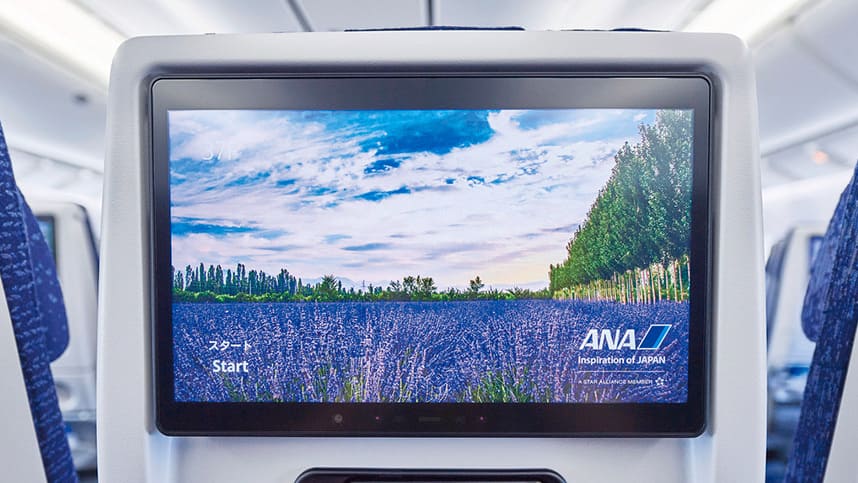
In-Flight Entertainment: ANA SKY CHANNEL
Our passengers can enjoy a wide range of in-flight entertainment programs spanning genres.
ANA SKY CHANNEL programs can be accessed in one of two ways:
- Via your individual seat monitor on the aircraft.
- Via MY SKY CHANNEL on the official ANA app.
- There may be instances when some portable devices are not available to use.
We have an excellent selection of movies, from Hollywood blockbusters and the latest Japanese releases to international titles yet to be shown in Japan. We also have a broad lineup of TV shows and a selection of other videos, including original ANA programs and sports and music shows.
And if you just want to relax and listen, we offer a wide variety of music genres and audio programs, from new songs to classic hits, traditional Japanese entertainment (Yose), audio books, collaboration programs, and more.
e-Library
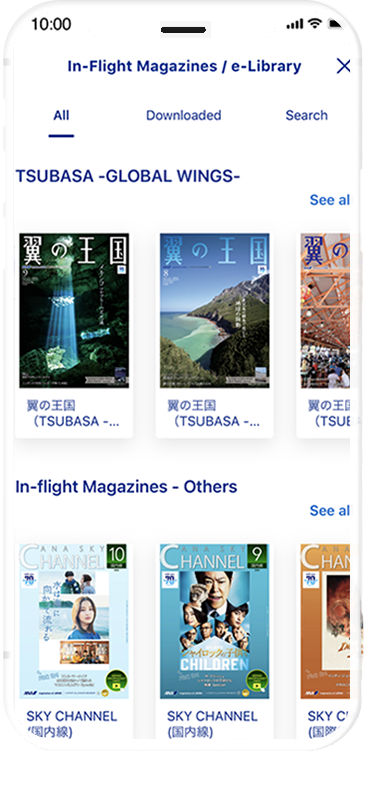
We have transitioned to digital format for our ANA Group in-flight magazine "TSUBASA -GLOBAL WINGS-" and other onboard printed publications. It will be available on your own digital device via ANA mobile application.
Newspapers will be enjoyable from July 1, 2021 in addition to "TSUBASA -GLOBAL WINGS-", and other various magazines (covering areas such as business, dining and sport).
"TSUBASA -GLOBAL WINGS-" is available on your web browser as well.
Check below for more details about the service and applicable customers.
Enhance Your Entertainment Experience with MY SKY CHANNEL
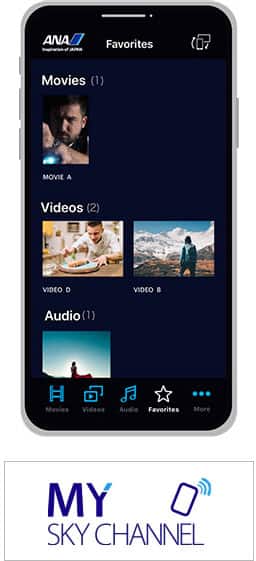
The official ANA app now features MY SKY CHANNEL. Before boarding, be sure to download the most recent version of the ANA app to your smartphone.
- * MY SKY CHANNEL is currently unavailable.
- Unavailable on tablets.
- Available on these aircraft:
- Boeing 777-300ER (new 212-seat configuration)
- Boeing 787-10
MY SKY CHANNEL Instructions
The official ANA app must be downloaded and installed before boarding.


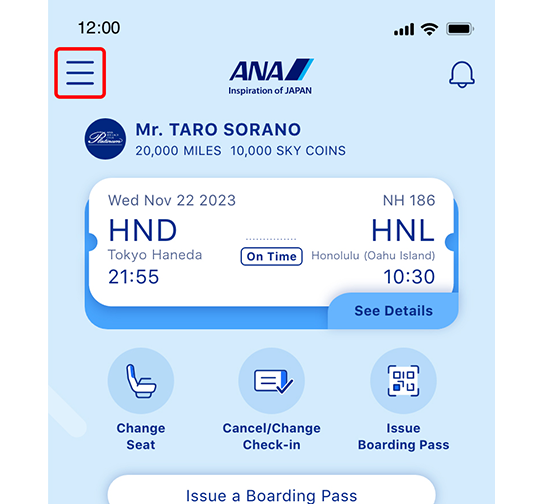
1: LAUNCH THE ANA APP AND OPEN THE SIDEBAR MENU
Tap the menu on the left side of the app screen.
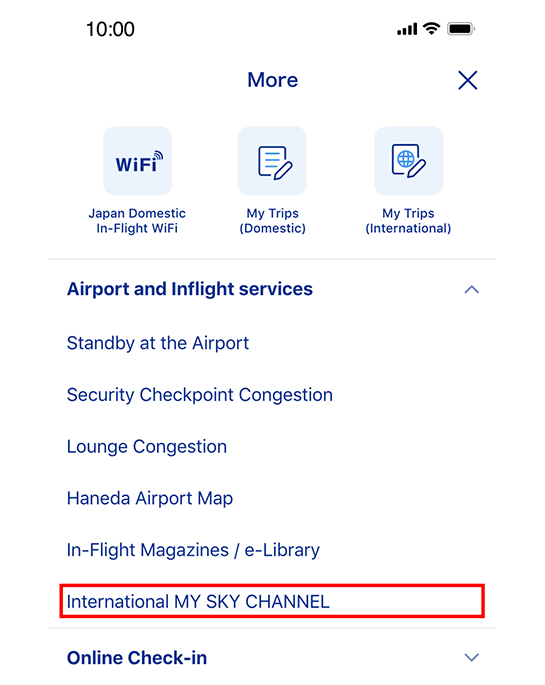
2. START INTERNATIONAL MY SKY CHANNEL
Tap International MY SKY CHANNEL from the menu list to connect.
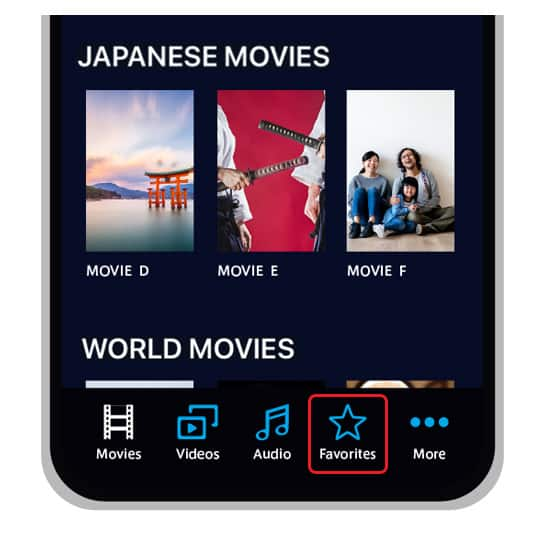
3. CREATE A LIST OF FAVORITES BEFORE BOARDING
You can use MY SKY CHANNEL ahead of time to find out what entertainment options will be available on your flight and to make a list of favorites.
- Select the contents you want to watch from the list and tap FAVORITE. The selected items will be added to your Favorites on the bottom right of the app screen.
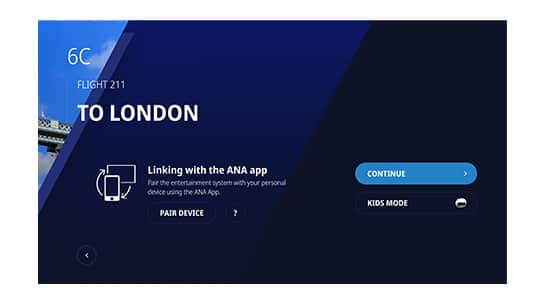
4. ENJOY YOUR ENTERTAINMENT
You can enjoy your selections via your individual seat monitor on the aircraft.
- You can even synchronize your list of pre-selected favorites to the personal monitor by connecting your device onboard. After connecting your smartphone to the monitor, you can use it as a remote controller to play, pause, fast-forward, etc., while enjoying your entertainment on your personal monitor.
ANA Wi-Fi Service (International Flights)
How to Use
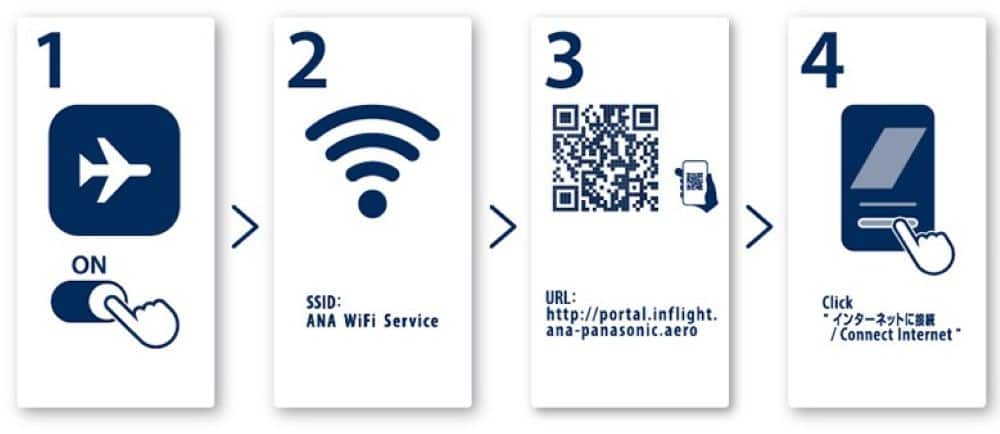
If you could not connect using the URL above, enter http://wifi.inflight.viasat.com/ in the URL bar.
Available Aircrafts
- * 〇 : Complimentary, △ : Paid, × : Not available
| Service | Aircraft Configuration | Class | Text Messaging *2 |
Web Browsing *3 |
Video Streaming *4 |
|---|---|---|---|---|---|
ANA Wi-Fi Service ANA Wi-Fi Service |
A380, B787, B777 | First Class | ◯ | ◯ | × |
| Business Class | |||||
| Premium Economy | ◯ | △ | × | ||
| Economy Class | |||||
| A320 *5 | Business Class | × | × | × | |
| Economy Class | |||||
| ANA Wi-Fi Service Powered by Viasat |
B767 | Business Class | ◯ | ◯ | ◯ |
| Economy Class | |||||
| No Wi-Fi Service | B767 | Business Class | × | × | × |
| Economy Class |
-
*1.You may find a placard titled "ANA Wi-Fi Service 2" attached to the cabin wall.
-
*2.Communications via apps such as LINE, WhatsApp, iMessage, Google Chat, and Facebook Messenger.
-
*3.You will not be able to stream video, or engage in other data-intensive activities, but music streaming services will be available.
-
*4.For paid video streaming services like Amazon Prime, Hulu and Netflix, customers' personal subscriptions are required
-
*5.Service is available while flying over Japan.
Pricing
A380, B787, B777
First Class, Business Class
Service is complimentary.
Passengers who have registered their email address will receive a free voucher code (one code per person) via email at least two hours before departure. Use the free voucher code for connection.
Premium Economy, Economy Class
Complimentary text messaging is available to passengers.
Web Browse will be available for a fee.
Fees
| Plan Name | Fees |
|---|---|
| 30 minute Plan | $6.95 |
| 3 hour Plan | $16.95 |
| Full-Flight Plan (max. 24 hours) | $21.95 |
- Countdown of time remaining begins from first sign-in and will expire after time elapses. Countdown cannot be interrupted once started.
B767
Business Class, Premium Economy, Economy Class
Service is complimentary.
Voucher code is not required for connection.
A320
Service is complementary and available while flying over Japan.
Voucher code is not required for connection.
FAQ
B777, B787, A380
FAQ
How much is the price?
First Class and Business Class passengers will have complimentary access. Premium Economy and Economy Class passengers can send and receive text messages free of charge. Web Browse will be available for a fee. Below is the pricing table.
Fees
| Plan Name | Fees |
|---|---|
| 30 minute Plan | $6.95 |
| 3 hour Plan | $16.95 |
| Full-Flight Plan (max. 24 hours) | $21.95 |
How can I get a receipt when I purchase a plan?
If you purchase a plan, a receipt will be sent to the email address. If you haven't received your receipt via email, please reach out to your service provider's customer support.
Can I use a credit card when purchasing a plan?
Yes, cash and debit cards are not accepted.
- B777 (THE Room seating type), B787, A380
-
- Credit card only (VISA, MASTER, DISCOVER, AMEX, JCB, DINERS)
- B777 (non-THE Room seating type)
-
- Credit card only (VISA, MASTER, DISCOVER, AMEX, JCB, DINERS)
- Apple Pay and Google Pay
I will be boarding First/Business Class. How can I connect to the Internet.
For First/Business Class passengers who have registered their email address will receive a free voucher code (one code per person) via email at least two hours before departure. Use the free voucher code and connect to the Internet.
ANA Mileage Club members will receive the same free voucher code via both email and the ANA App*
- * Notification will be sent to devices on which ANA app push notification has been enabled.
How to check
STEP1
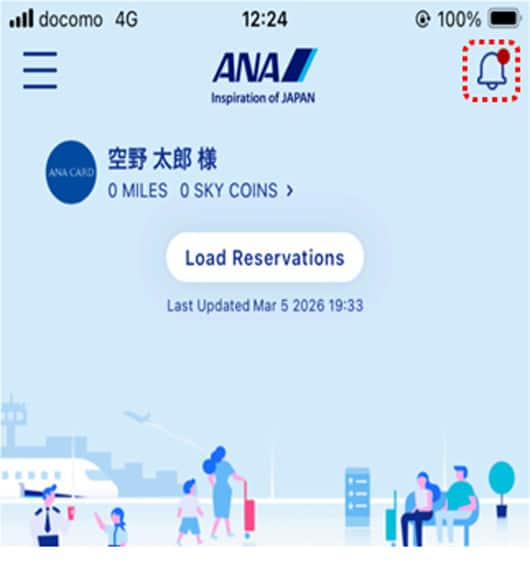
Tap the notification icon in the ANA app.
STEP2
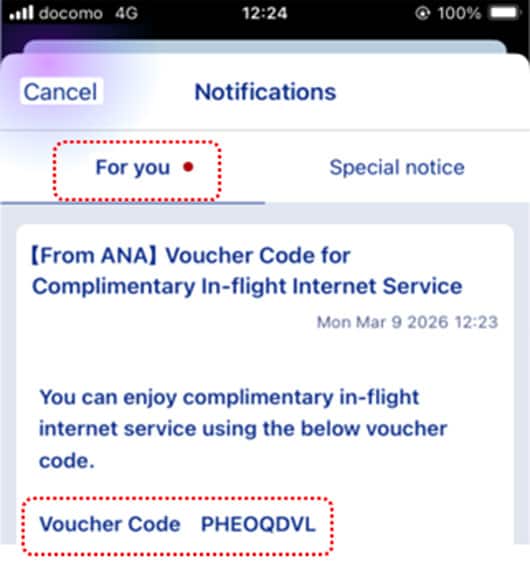
Find your voucher code in "Notifications for You."
I will be boarding First/Business Class. Free voucher code does not arrive in my email.
Please contact the cabin attendant. They will provide you the free voucher code.
I will be boarding First/Business Class. What should I do to receive the email with free voucher code?
Please check whether your email address has been registered correctly. If it is registered correctly, please check the spam email.
About how to receive the voucher code
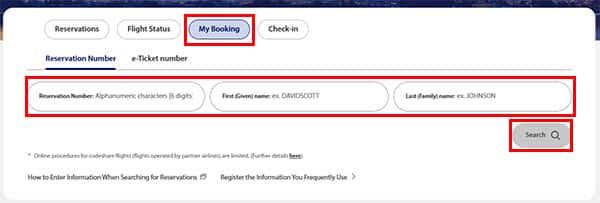
From the top page select "My Booking". Enter your booking information and select "Search".
- Each passenger receive by themselves
-
- Under "Enter Passenger Information", select "Specify email address and send to this address".
- Register email address
- * ex : Voucher code will be sent to email address "sorano@ana.co.jp", "ozora@ana.co.jp"

- Passenger representative receive all
-
- Under "Representative", select "Register email address"
- Under "Enter Passenger Information", select "Send to representative's email address"
- * ex : Free voucher codes for the MR TARO SORANO and the passenger MS HANAKO OZORA will be sent to "sorano@ana.co.jp".
- If you booked through a travel agency, you may not be able to register the representative's contact information. In this case, please select the option to "Each passenger receive by themselves."

I will be boarding First/Business Class and I selected "Send to representative's email address". However, representative will get on board at economy class. Can I receive the free voucher code.
Yes, the representative will receive your free voucher code.
Can I use the free voucher code which I used previously.
No, you cannot use the free voucher code multiple times. It is for one-time use only.
Can I use multiple devices simultaneously?
Simultaneous connection is limited to one device only, but you can use multiple devices alternately.
Can the purchased or connected plan be used on connecting flights?
Internet access is only available on the flight where the Wi-Fi plan was purchased or activated.
When can I use the Internet?
Available approximately 5 minutes after take-off until 5 minutes prior to landing.
Where can I use the Internet?
Aside from takeoff and landing, you can enjoy the Internet in all airspaces throughout your entire flight.
The service may be unstable or subject to disconnection due to satellite communication reception, even in areas where the service can be used.
- * Due to the current situation in Russia and Ukraine, flights to Europe are rerouted to take an alternate flight path.Therefore, the satellite link will be disconnected for about 1-2 hours and the Internet will be temporarily unavailable, when flying over the Arctic airspace.
Can I use voice & video call functions on board?
In order not to disturb other passengers, we kindly ask you to refrain from using voice & video call functions.
Can I download or upload large amounts of data?
Limits apply when downloading or uploading large amounts of data.
Precautions for Use
- As the service is provided by satellite, communication may become unstable or the connection may be cut off in certain areas depending on the flight route and weather conditions.
- You may encounter difficulty connecting to the internet when there are many passengers accessing the service.
- The ANA Wi-Fi Service may be suspended at any time during the flight for security or other reasons.
- Please note that the internet communication environment in the cabin is not at the same level as on the ground, both in terms of speed and capacity.
- The service may be unstable or subject to disconnection due to satellite communication reception, even in areas where the service can be used.
- This service uses wireless LAN technology. Please be aware that there is a possibility of communication interception and unauthorized access, similar to the use of other wireless hotspots where public access is available in a similar way to the use of other wireless hotspots where public access is available. We highly recommend security measures such as firewalls and/or security software at your own responsibility while using this service.
- Internet may be suspended or unavailable at any time during the flight for security or other reasons. ANA shall not be held responsible for any loss of data, device failure, or opportunity loss that may occur if part or all of this service is unavailable.
- We recommend that you disable automatic updates of software and applications running in the background.
- First, please check that your electronic device supports Wi-Fi. If the problem continues, we recommend that you contact the manufacturer of your digital device or your network administrator in the case of company laptops.
B767
FAQ
How much is the price?
"ANA Wi-Fi Service Powered by Viasat" is complimentary for all classes.
When can I use the Internet?
Available from boarding until de-boarding. If there are regulations from the destination's authorities, you may use it from approximately 5 minutes after take-off until 5 minutes prior to landing.
Can I use voice & video call functions on board?
In order not to disturb other passengers, we kindly ask you to refrain from using voice & video call functions.
Precautions for Use
- As the service is provided by satellite, communication may become unstable or the connection may be cut off in certain areas depending on the flight route and weather conditions.
- You may encounter difficulty connecting to the internet when there are many passengers accessing the service.
- The ANA Wi-Fi Service may be suspended at any time during the flight for security or other reasons.
- Please note that the internet communication environment in the cabin is not at the same level as on the ground, both in terms of speed and capacity.
- The service may be unstable or subject to disconnection due to satellite communication reception, even in areas where the service can be used.
- This service uses wireless LAN technology. Please be aware that there is a possibility of communication interception and unauthorized access, similar to the use of other wireless hotspots where public access is available in a similar way to the use of other wireless hotspots where public access is available. We highly recommend security measures such as firewalls and/or security software at your own responsibility while using this service.
- Internet may be suspended or unavailable at any time during the flight for security or other reasons. ANA shall not be held responsible for any loss of data, device failure, or opportunity loss that may occur if part or all of this service is unavailable.
- We recommend that you disable automatic updates of software and applications running in the background.
- First, please check that your electronic device supports Wi-Fi. If the problem continues, we recommend that you contact the manufacturer of your digital device or your network administrator in the case of company laptops.
Inquiry
B777 (THE Room seating type), B787, A380, A320
Panasonic Avionics Customer Care
Contact by phone

(Toll-free number for calls from within Japan / Japanese support)
- * Not available when calling from an IP phone.

(Number for calls from outside Japan / Japanese support)
- * Toll charges may apply.
- * 09:00-17:30 JST (not available on weekends, public holidays, and the year-end/New Year holiday period)
(English support)
- * Toll charges may apply.
- * 09:00-17:30 JST (not available on weekends, public holidays, and the year-end/New Year holiday period)
Email inquiry

(Available in Japanese & English)
B777 (THE Room seating type)
Inmarsat Customer Care
Email inquiry
(Available in Japanese & English)
- * ANA Wi-Fi Service Powered by inmarsat is provided by JSAT MOBILE Communications Inc. and Inmarsat.
The Internet access service is provided by JSAT MOBILE Communications Inc.
If you have any questions and/or comments, please contact the Inmarsat Customer Care Center.
B767
Viasat Customer Care
Email inquiry
Please access the site from here and fill out the form. (Available in Japanese & English)
- * Limited to some B767-300ER (202 seats) aircraft equipped with internet access. On eligible aircraft, an ANA Wi-Fi Service placard will be attached to the cabin wall.