


Please note that some changes will take effect from May 19, 2026, due to the renewal of our domestic passenger service system.
Further details will be announced soon.
Key Changes
- Redesigned Online Check-in page
- For flights operated by our Japan domestic partner airlines (codeshare flights), please check-in via the operating carrier's website
- Receipts cannot be issued by self-service check-in machines. They are issued via the Receipt Web Display Service.
- Standby at the airport will require check-in of the reserved flight
- If a seat is assigned through standby at the airport, your original flight will be automatically canceled
Check-in
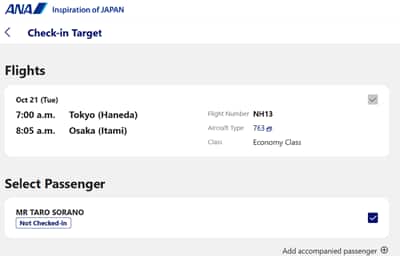
Online Check-in
The online check-in pages of the ANA website/ANA app are being redesigned.
Online check-in will be available for both Japan domestic itineraries and international itineraries via the same page and process.
Please see Online Check-In for information of how to use this.
An email address is required for online check-in.
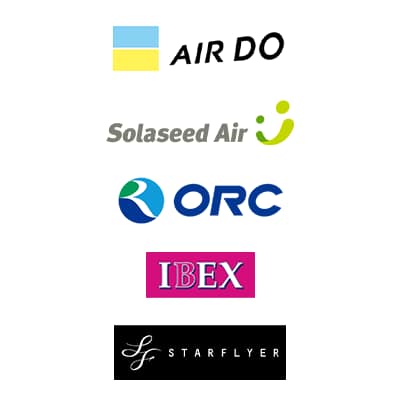
Check-in for Codeshare Flights Operated by Japan domestic Partner Airlines
For code-share flights operated by Japan domestic partner airlines*1, online check-in will change to be conducted via the operating carrier's website.
Please complete the check-in using the URL provided in the "Check-in Information" that will be sent to you via email.
Online check-in will not be available via the ANA Website or ANA App.
Note that for codeshare flights operated by partner airlines, service is subject to the operating airline's regulations.
In addition, flight status information will also be provided by the operating airline.
See Codeshare Flights (Jointly Operated Flights) for details regarding check-in procedures and services on codeshare flights.
-
*1.Eligible Japan domestic partner airlines include AIRDO (ADO), Solaseed Air (SNJ), StarFlyer (SFJ), IBEX Airlines (IBX), and Oriental Air Bridge (ORC). Flights operated by operated by Japan Air Commuter (JAC) or Amakusa Airlines (AMX) are excluded.
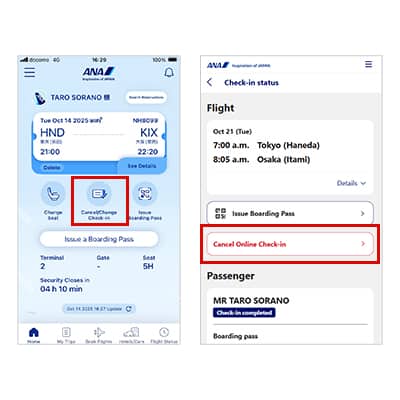
Check-in Cancellation
If you are unable to board your reserved flight after check-in and need a refund, you must first cancel your check-in and then request the refund no later than 20 minutes prior to departure. Failure to request a refund by the departure time will result in a cancellation fee equal to 100% of the fare amount excluding tax.
For details, please refer to the "Various Charges Related to Flight Tickets (Japan Domestic Flights)" page.
Change Flight
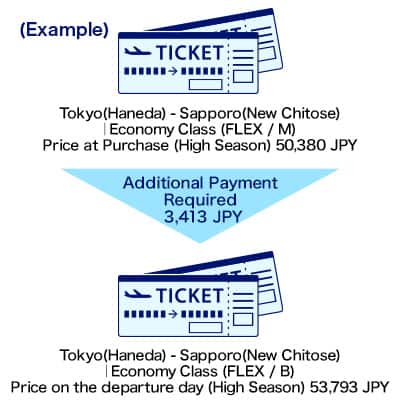
Flight Changes at the Airport on the Day of Departure
If you change flights on the same route at the airport on the departure day using a changeable fare, a fare difference may apply depending on seat availability.
(You can also change your reservation on the ANA website/ANA app.)
-
Some service restrictions apply to same-day flight changes when your reserved flight or preferred flight includes a codeshare flight operated by a partner airline.
See Codeshare Flights for details.
Self-service check-in machine, etc.

Issuing Receipts at Self-Service Check-In Machines
Receipt issuance will no longer be available at self-service check-in machines.
Receipts can be issued via the Receipt Web Display Service.
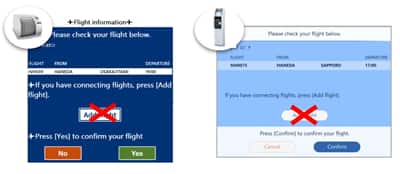
Changes to ANA Baggage Drop and ANA Baggage Tag Kiosk
If you have separate reservations for connecting flights and wish to check your baggage through to the final destination, please proceed to the airport counter. (You cannot add itineraries at self-service baggage drop machines or baggage tag kiosks.)
Standby at the Airport
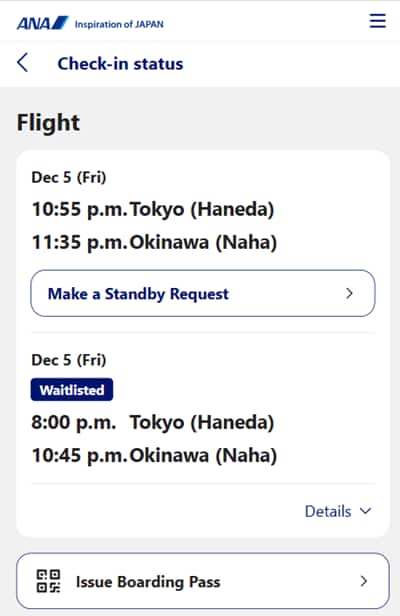
About Standby Service
If your desired flight is full, standby is available from midnight on the departure date up to 20 minutes before the departure time of your desired flight.
If a seat becomes available, please proceed to board the new flight with a new boarding pass.
(Please note: Once a seat is secured, your original reserved flight will be automatically cancelled.)
If a seat does not become available, and you wish to continue standby, you will need to re-apply.
Please see the changes to our airport standby service.
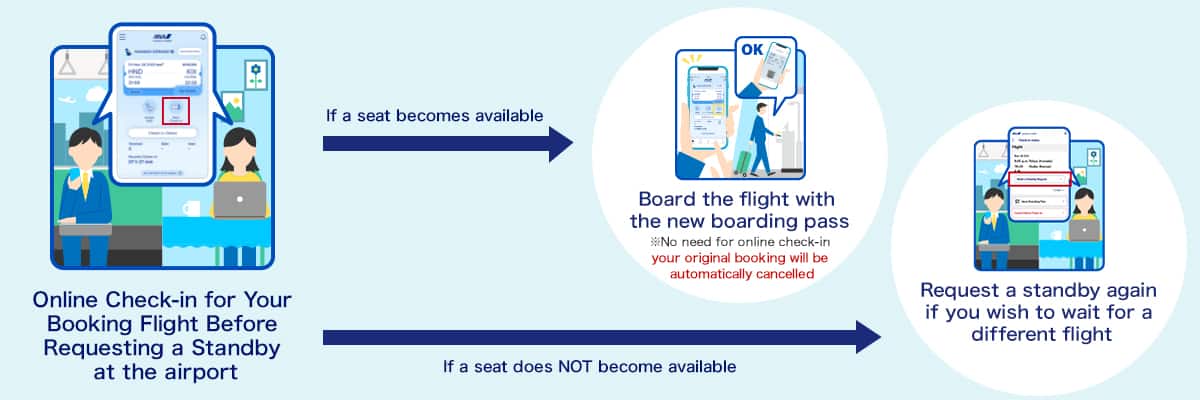
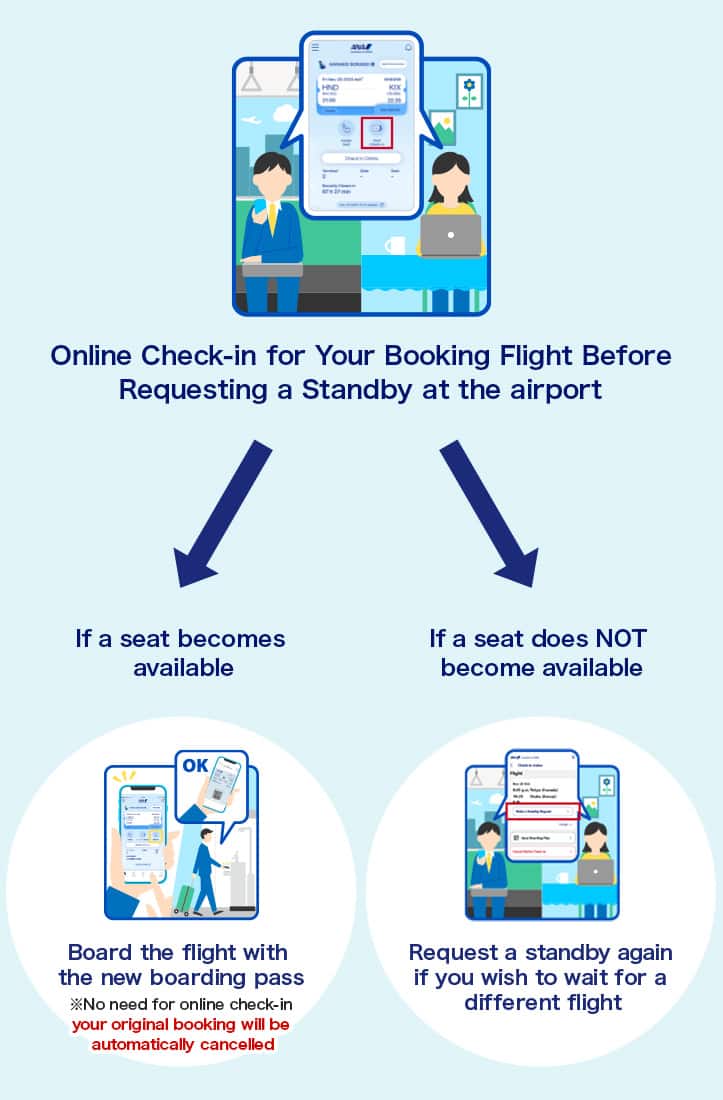
Changes to the Standby Service
| Item | Changes to the Standby Service |
|---|---|
| Prerequisites | When making a standby request on the ANA Website, you must check in for your reserved flight. |
| Conditions for Making a Standby Request | You can only make a standby request if the following conditions are met.
* Same conditions apply for cancellations and delays caused by poor weather. (Example: You cannot make a standby request if you do not have a reservation for the same day on which you make the standby request.) |
| After Making a Standby Request | A standby reference number will not be issued after you have completed your standby request. You can check standby status via the Online Check-in page for your reserved flight. |
| If Seats Have Assigned | If a seat assigned by an airport standby request, your original reservation will be automatically canceled. * If you decide to fly on your reserved flight, you must cancel your standby request no later than 20 minutes before the departure time of the standby flight. Also, when a seat is available, you will be automatically checked in for the flight. |
| If Seats Have Not Assigned | If you wish to continue on standby on another flight, you will need to make another standby request. |
Other Situations Where Standby is Unavailable
Standby applications may be unavailable or partially restricted for certain customers.
- * "〇" indicates requests can be made for the service; and "×" indicates requests cannot be made.
| Case | Request Online | Request at an Airport Counter |
|---|---|---|
| Passengers whose fares do not allow airport standby | × | × |
| Standby for flights departing from/arriving at an airport different from your reserved flight | × | × |
| Standby for flights departing from a different terminal from your reserved flight | × | × |
| Passengers who purchased their ticket via a travel agency | × | 〇 |
| Group passengers | × | × |
| Passengers with reservations that include international flights | × | 〇 |
| Passengers requiring special assistance | 〇*1 | 〇 |
| Passengers with Cabin Baggage Fees or who have purchased an extra seat | × | × |
| Standby Requests for Select Passengers on a Multi-Party Reservation | × | 〇 |
| Standby when your reserved flight or preferred flight includes a codeshare flight operated by a partner airline*2 | × | 〇 |
| Standby from Economy Class to Premium Class on a reserved flight | 〇 | 〇 |
-
*1.Boarding passes are issued at the airport counter.
-
*2.For standby requests involving codeshare flights operated by partner airlines:
- Restrictions on web: Certain online procedures may be unavailable after requesting for standby. For changes or refunds, contact the ANA Domestic Reservation Center. For boarding inquiries, please visit the airport counter.
- Results & Boarding: Results of standby requests are sent via email or shown on boarding area displays. When a seat is ready for you, use your standby boarding pass to board. Either the boarding pass for your original flight or standby flight can be used to pass through security.
-
Mileage Accrual:If a seat is confirmed for a codeshare flight operated by a partner airline, it may take longer than usual for your miles to be credited. Please note that if your frequent flyer number was not registered at the time of booking, you will need to request a "Retroactive Mileage Registration" after your flight.
Eligible partner airlines include AIRDO (ADO), Solaseed Air (SNJ), StarFlyer (SFJ), IBEX Airlines (IBX), and Oriental Air Bridge (ORC).
Flights operated by Japan Air Commuter (JAC) or Amakusa Airlines (AMX) are excluded.
Important Notice Regarding the Upgrade Standby Service
| Item | Notice |
|---|---|
| Lounge Service | Lounge access is not permitted for passengers whose upgrade for Premium Class has not yet been confirmed. |
| Checked Baggage | Bags checked before an upgrade confirmation will not receive the higher class priority baggage handling or increased baggage allowance. * We will be unable to refund any excess baggage charges you have paid, even in cases where your upgrade to a higher class has been confirmed. |