



In-flight Entertainment
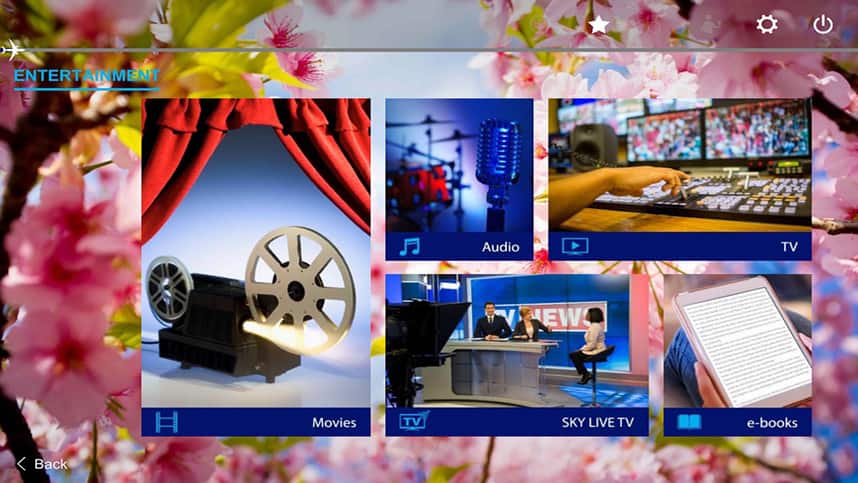
ANA In-flight entertainment make air travel more enjoyable
You can enjoy blockbusters from around the world both old and new, TV shows including dramas, variety, animations and audio programs!
- * On some flights, some programs at the beginning and end of the month may differ from those indicated.
- * Please note that it may not be possible to watch certain programs in their entirety within the flight time.
- * Programs may change without prior notice.
e-Library
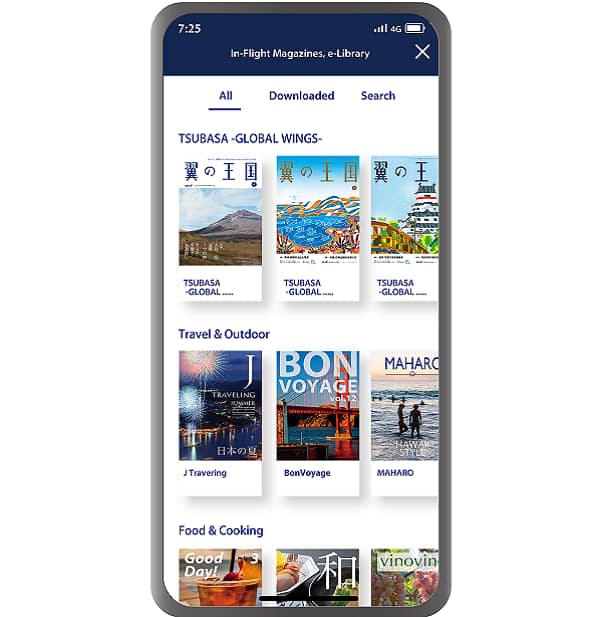
Digital ver of magazines and newspapers are available on your own digital device via ANA mobile application.
Enjoy the greatly expanded library through out your journey.
- * Certain restrictions apply
Check below for more details about the service and applicable customers.
ANA Wi-Fi Service (Domestic Flights)
How to Use
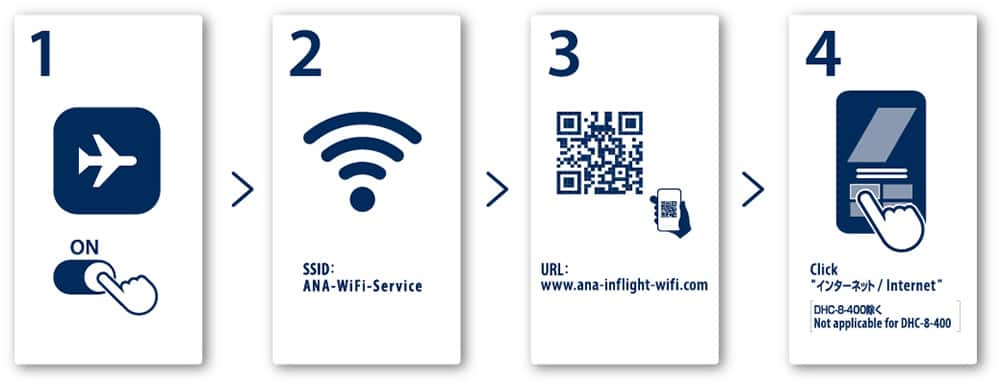
You can also connect via the ANA app. An update to the latest version is required before boarding.
Available Aircrafts
- * ◯ : Available, × : Unavailable
| Service | Aircraft Configuration | Text Messaging *1 |
Web Browsing |
Video Streaming *2 |
Wireless Entertainment |
|---|---|---|---|---|---|
| ANA Wi-Fi Service Powered by Panasonic |
78K, 78P, 773, 772, 722, 76P, 738, A321 | 〇 | 〇 | 〇 | 〇 |
| 78G *3, 32P | 〇 | 〇 | 〇 | × | |
| ANA Wi-Fi Service Powered by Viasat |
76E | 〇 | 〇 | 〇 | × |
| ー | 76E | × | × | × | × |
| Q4A | × | × | × | 〇 |
-
*1.Communications via apps such as LINE, WhatsApp, iMessage, Google Chat, and Facebook Messenger.
-
*2.For paid video streaming services like Amazon Prime, Hulu and Netflix, customers personal subscriptions are required.
-
*3.Some aircraft may be equipped with wireless entertainment.
FAQ
FAQ
How much is the price?
ANA Wi-Fi Service on domestic flights is complimentary for all class.
When can I use the Internet?
- Aircraft type: 789,78G,78P,773,772,722,76P,738,A321,32P
-
Available approximately 5 minutes after take-off until 5 minutes prior to landing.
- Aircraft type: 78K
-
Available from taxiing until gate arrival.
- Aircraft type: 76E (Limited to some B767-300ER (202 seats) aircraft equipped with internet access)
-
Available from boarding until disembarking.
- * aircraft code is displayed on the reservation screen
Can I use voice & video call functions on board?
In order not to disturb other passengers, we kindly ask you to refrain from using voice & video call functions.
Can I download or upload large amounts of data?
Limits apply when downloading or uploading large amounts of data.
What do I do if I cannot connect?
- When connecting through ANA App
-
- When using an Apple device with iOS 14 or later, please go to settings and turn on local network access.
- On devices running iOS 13, Android 9 or later, location permission may be required to connect.
- If you are still unable to connect
-
- If you are using an iPhone, you will need to turn off Private Browsing Mode.
- You need to enable JavaScript and cookies.
- Clearing your browser cache (history) may solve the problem.
- * We use JavaScript to provide a safe environment for customers using the service. If your device does not support JavaScript, it cannot be used for in-flight Wi-Fi internet access. Please enable JavaScript if your device supports it.
You must enable cookies on your device. A cookie is a small data file that will be saved on your device when using a web browser.
I cannot view wireless entertainment content.
Please check if your ANA app is updated to the latest version.
Please also check if you are connecting from a supported browser.
The following OS and browsers are supported.
OS/Browsers
| Smartphone/Tablet iOS |
Smartphone/Tablet Android |
Laptop Windows |
Laptop Mac |
|
|---|---|---|---|---|
| Safari | ○ | × | × | ○ |
| Google Chrome | × | ○ | × | × |
| Firefox | × | × | ○ | ○ |
| Edge | × | × | ○ | × |
- * Please update your OS and browsers to the latest version.
- * Some smartphones/tablets with Android 13 and above does not support wireless video content.
Precautions for Use
- As the service is provided by satellite, communication may become unstable or the connection may be cut off in certain areas depending on the flight route and weather conditions.
- You may encounter difficulty connecting to the internet when there are many passengers accessing the service.
- The ANA Wi-Fi Service may be suspended at any time during the flight for security or other reasons.
- Please note that the internet communication environment in the cabin is not at the same level as on the ground, both in terms of speed and capacity.
- The service may be unstable or subject to disconnection due to satellite communication reception, even in areas where the service can be used.
- This service uses wireless LAN technology. Please be aware that there is a possibility of communication interception and unauthorized access, similar to the use of other wireless hotspots where public access is available in a similar way to the use of other wireless hotspots where public access is available. We highly recommend security measures such as firewalls and/or security software at your own responsibility while using this service.
- Internet may be suspended or unavailable at any time during the flight for security or other reasons. ANA shall not be held responsible for any loss of data, device failure, or opportunity loss that may occur if part or all of this service is unavailable.
- We recommend that you disable automatic updates of software and applications running in the background.
- First, please check that your electronic device supports Wi-Fi. If the problem continues, we recommend that you contact the manufacturer of your digital device or your network administrator in the case of company laptops.
Inquiry
Panasonic Avionics Customer Care
Contact by phone

(Toll-free number for calls from within Japan / Japanese support)
- * Not available when calling from an IP phone.

(Number for calls from outside Japan / Japanese support)
- * Toll charges may apply.
- * 09:00-17:30 JST (not available on weekends, public holidays, and the year-end/New Year holiday period)
(English support)
- * Toll charges may apply.
- * 09:00-17:30 JST (not available on weekends, public holidays, and the year-end/New Year holiday period)
Email inquiry

(Available in Japanese & English)
Visasat Customer Care
Email inquiry
Please access the site from here and fill out the form. (Available in Japanese & English)
- * Limited to some B767-300ER (202 seats) aircraft equipped with internet access. On eligible aircraft, an ANA Wi-Fi Service placard will be attached to the cabin wall.
To use the service, downloading ANA mobile app prior to boarding is recommended.