Get your digital card immediately
No enrollment or annual fees
ANA Mileage Club Card
Earn more miles for your money
With credit function
ANA Card
Standby is available if there are no seats left on your preferred flight. Please see here for details on Waitlist Reservations.
You can check the status of your standby request in real time online.
As the various handling procedures will be different for flights operated by Japan Air Commuter and Amakusa Airlines, you are kindly requested to see the information on the Japan Air Commuter or Amakusa Airlines page before you travel on such flights.
Please submit a request using the button below.
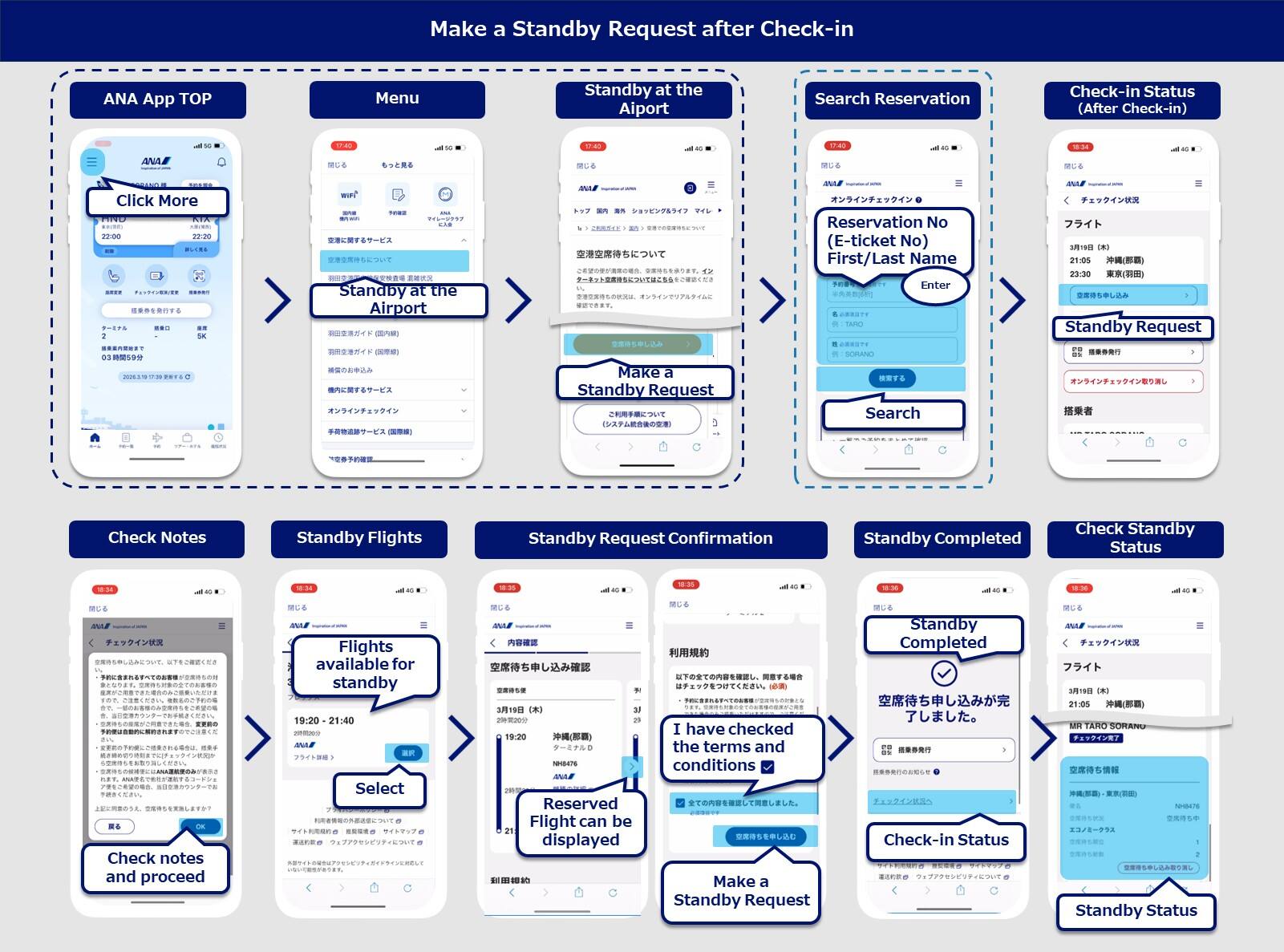
Smartphone (ANA app/iPhone)
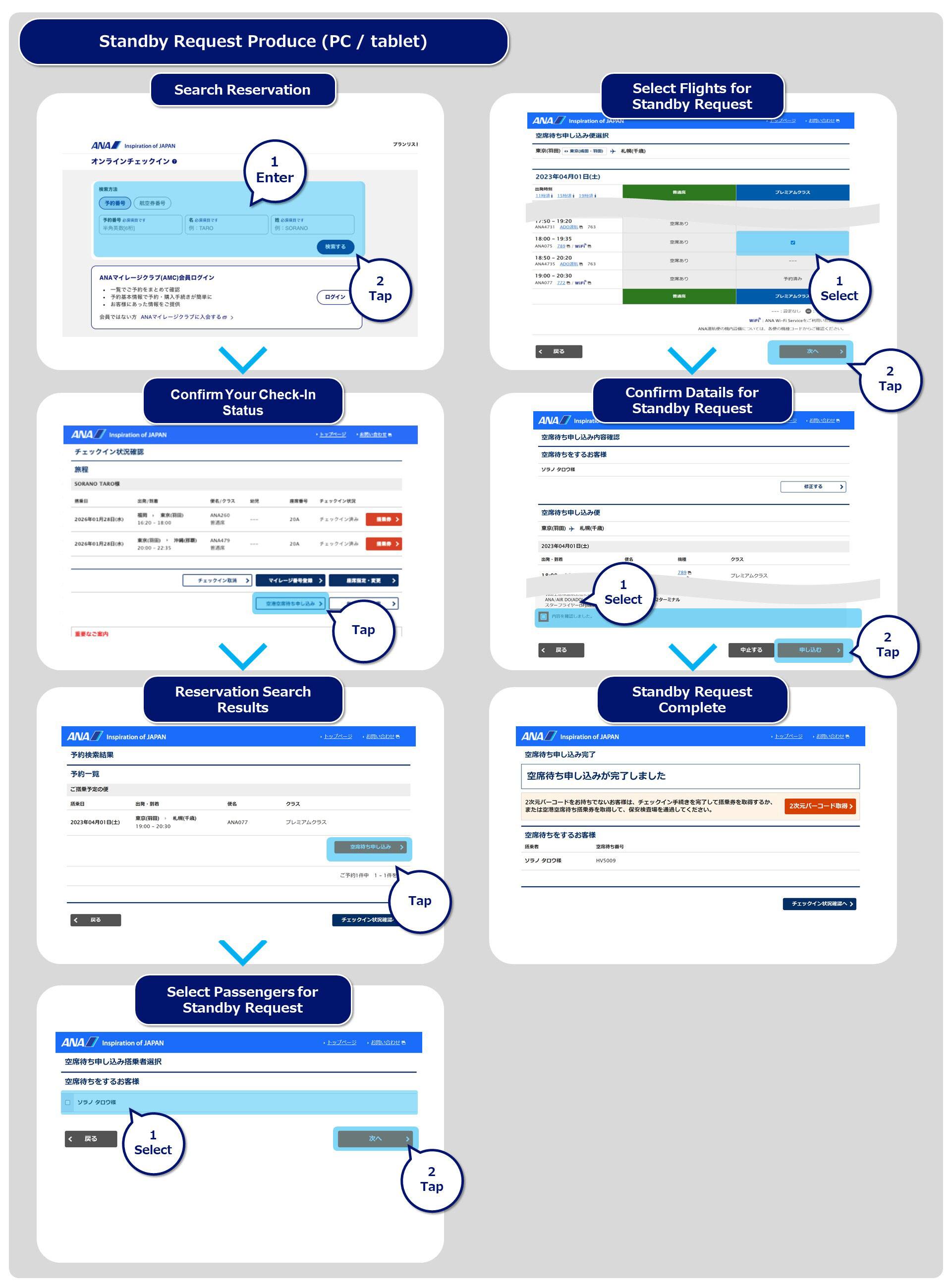
PC/Tablet
A standby reference number will be issued after you have completed your standby request.
You will require your standby reference number to look for updates on the digital sign, etc. and for confirmation purposes when a seat becomes available. Therefore, we kindly request that you note down or take a screenshot of this number before coming to the airport.
You can check the status of your standby at the airport requests in real time online.
Please pay for your flight ticket before making your request.
If you already have a flight reservation, you cannot make a standby request for a flight with a later departure time.
If you make a standby request for Premium Class and Economy Class on the same flight, we will first try to secure you a seat in Premium Class.
Passengers who wish to check in baggage* should do so after their flight has been confirmed.
If you have items that are not allowed to be carried on board the aircraft, please inform a member of staff before passing through the security checkpoint.
If you would like to check in a pet, please pay the pet fee at the baggage counter before passing through the departure security checkpoint.
Please pass through the security checkpoint at least 20 minutes prior to the departure time of the flight for which you have made a waiting list request. Please present the items listed below to the scanners at the security checkpoint when you pass through.
Your boarding pass for the booked flight* that you are already checked in for
If you have an open-ended ticket and have not pre-booked a flight, this will be a 'airport waiting list boarding pass'.
You will only be eligible for a seat if you have passed through the security checkpoint at least 20 minutes prior to the departure of the flight for which you have made a standby request.
Customers who are using a different flight ticket (one other than the boarding pass you presented at the security checkpoint of the airport your flight is departing from) and have submitted a waiting list request should please report to an ANA member of staff.
For example, if you have made a standby request for your connection flight which you reserved as a separate itinerary.
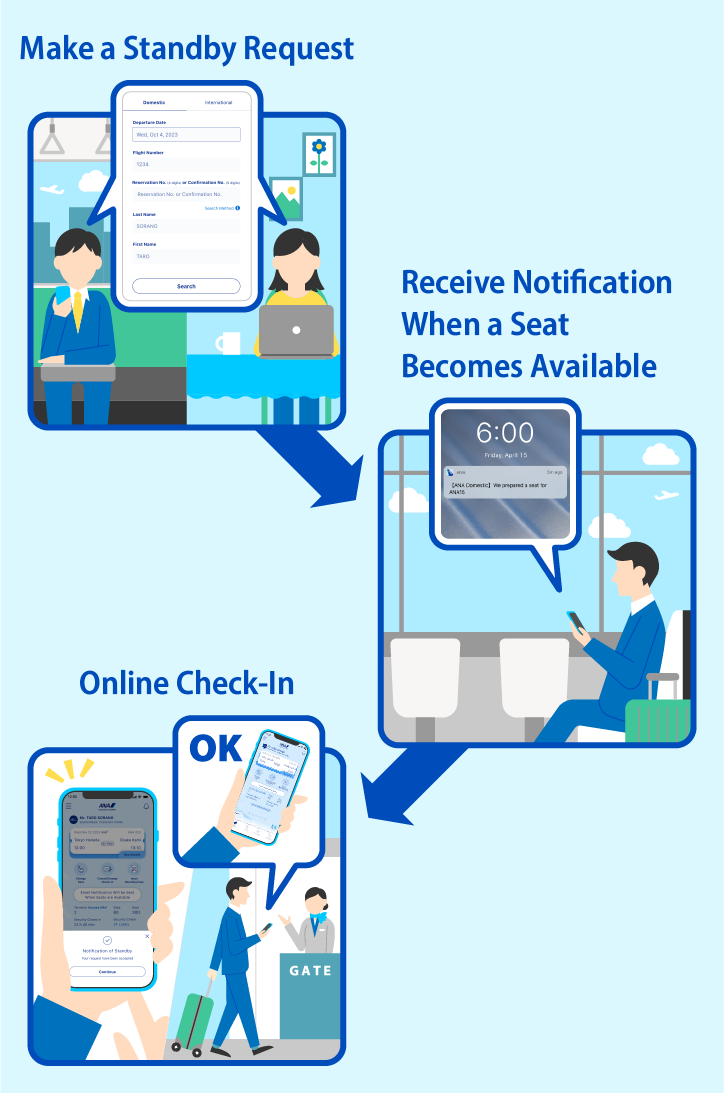
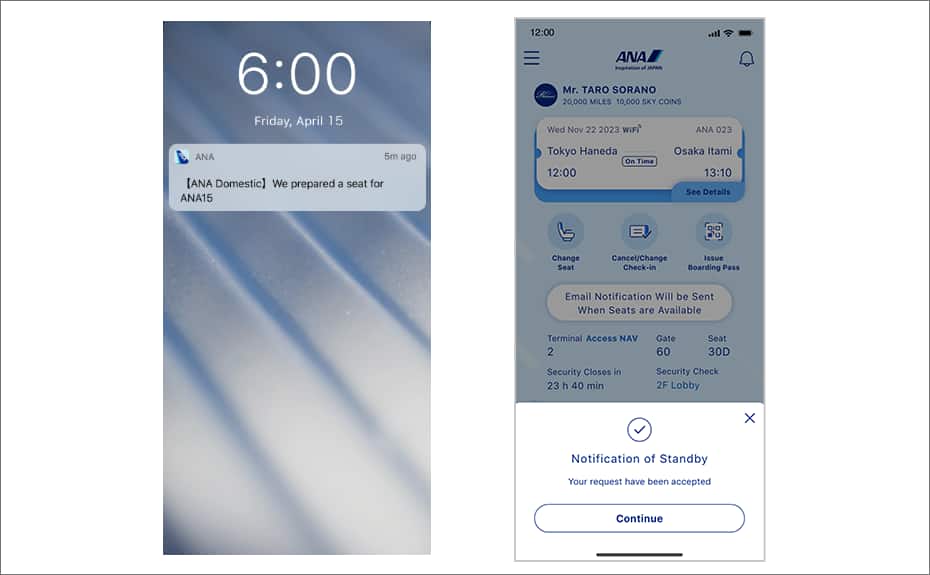
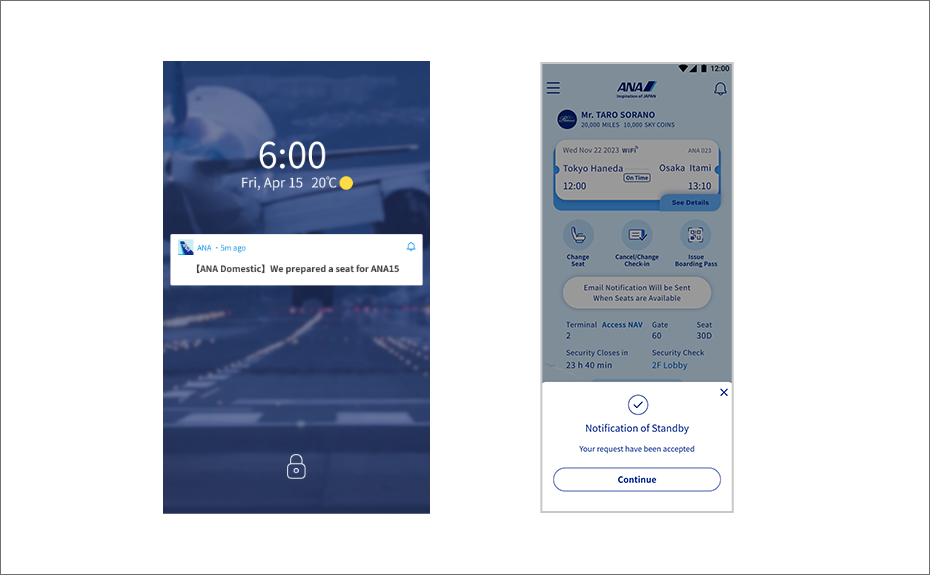
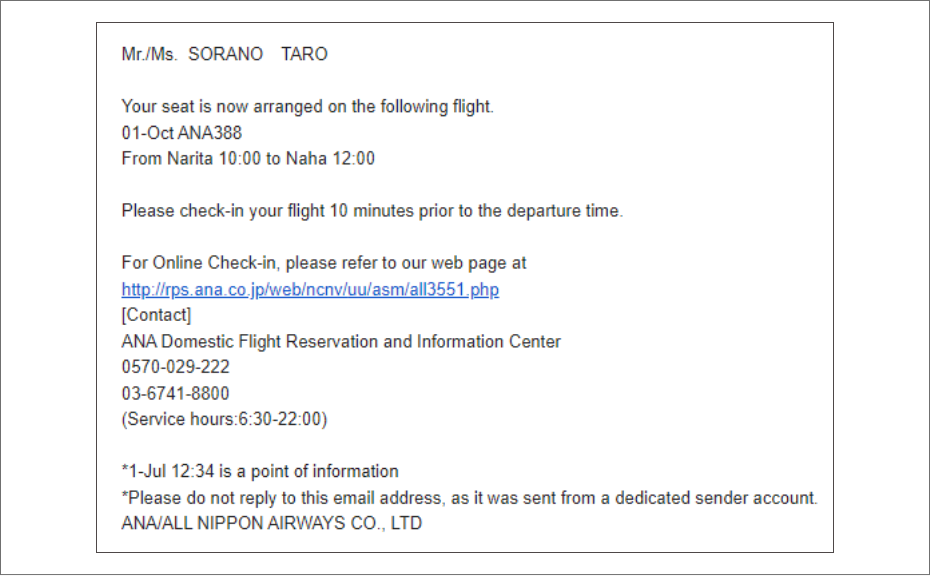
If a seat becomes available, you will be notified via the following means sometime from 20 minutes prior to the flight’s departure: A push notification from the app, an email, and the digital sign.
iOS
android
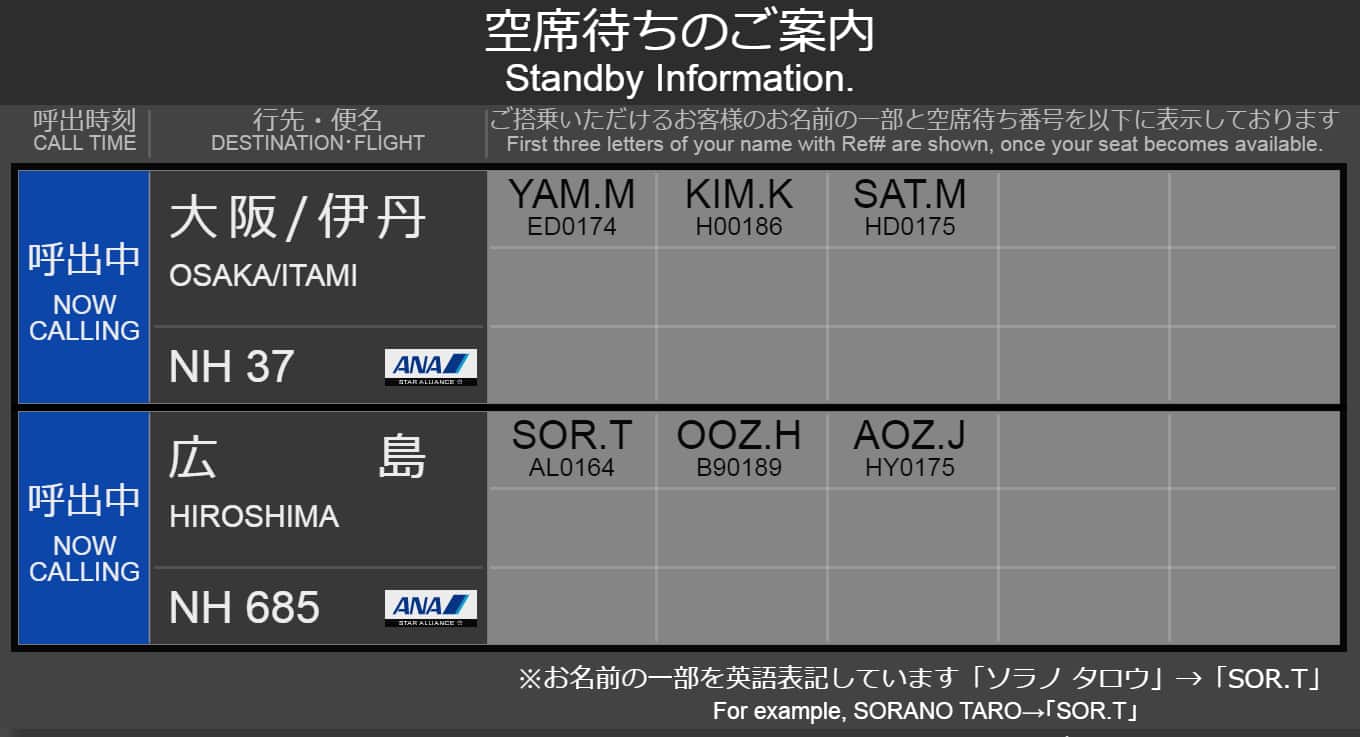
The digital sign can be found at the designated location where passengers will be notified past the security checkpoint, and shows by flight the standby reference numbers and the partially written names of the passengers for whom seats have been secured.
Passengers will be notified of standby request results in the gate area past security at all airports.
Depending on the flight status, the time and location where passengers are notified if a seat has been secured for them may change.
Passengers whose flights have been canceled may be notified before other passengers.
App: Check in with a single tap on the notification.
Email: Press the URL and then check in on the ANA website.
To check in from this screen, press here.
If you can receive notifications and check in online, there is no designated location at which you need to perform the procedures.
After confirming that a seat has been secured for you, please check in online from your own device.
Passengers who wish to confirm the digital sign and those who cannot check in online are kindly asked to come to the designated location where they will be notified.
If you wish to check in baggage, please inform a member of staff.
If online check-in is not available for your flight ticket, please inform a member of staff so that they can perform the procedures for you.
After you have checked in to a flight where you have secured seating, please touch your boarding pass against the ticket gate and board your flight.
Flights departing on the standby request date
Requests are accepted from 0:00.
Requests can only be made for flights departing before the currently reserved flight or for a different class on the currently reserved flight.
If you have a fare for which reservation changes are not permitted, you can only make a standby request for an upgrade on the currently reserved flight.
If your originally reserved flight is canceled or delayed*1, you can make a standby request after the time it was scheduled to depart for flights departing on the day following the standby request date*2.
This refers to flights that are expected to be or have been delayed or canceled due to bad weather or similar reasons. After you have completed the procedures for a flight transfer (reservation change), it will only be possible to make a standby request for a flight departing on the standby request date.
Requests can be made for flights departing up to 10 days after the departure date shown on the existing flight ticket.
You can make a standby request for a flight departing one day prior*1 to the currently reserved flight only if you have a fare for which reservation changes are permitted.
However, the timing at which requests can be made is the same as in (1) above.
Requests are gradually accepted from 0:00.
Example: You have a reservation for a flight on July 2 and wish to make a standby request on July 1
<Flights for Which Standby Requests Are Available>
| Flight Status | Flight Reserved |
Flights Departing on July 1 |
Flights Departing on July 2 |
|---|---|---|---|
| flight operated normally | Yes | 〇 | × (Requests can be made from July 2) |
No (open-ended ticket) |
〇 | × (Requests can be made from July 2) |
|
| In the Case of a Flight Cancellation / Delay | Yes No (open-ended ticket) |
〇 | 〇 |
Customers to whom the following apply will not be able to use the online check-in that is available after submitting an online waiting list request and securing seating.
We will check you in at our airport counter.
| Case | Standby Request on the Online |
Online Check-In After Seat Becomes Available |
|---|---|---|
| You have an international flight ticket | × | × |
| There is a fare difference between your currently reserved flight and the flight for which you have made a standby request | × |
× |
| Your flight ticket has the flight number of a partner airline*1 | × |
× |
| You have paid a special fee*2 | × | × |
| You have a group flight ticket | × | × |
| Customers Who Need Assistance*3 | 〇 | × |
| Upgrade to Premium Class | 〇 | △*4 |
If your reservation contains both a flight ticket with a partner airline flight number and a flight ticket with an ANA flight number, you will only be able to make a standby request for the ANA flight.
Special fees: Special passenger fee, stretcher fee
If you have a stretcher reservation, you cannot make a standby request online.
Online check-in will only be available if the logged in member has used Upgrade Points for their upgrade. If you wish to use a different payment method for your upgrade, please perform the necessary procedures at an airport counter.
In addition to the above, there may be cases in which online check-in is not available depending on the completion status of procedures.
Standby requests require checking in.
If you have not yet checked in, please check in using the Make a Standby Request button.
From May 19 to the end of June 9 2026 (planned), the Japan domestic and international passenger service systems will be integrated to a new system by airport.
Please confirm the system migration schedule for each airport based on the departure date and departure airport of your reservation via the webpage about service limitations during the system transition period, and then check the corresponding procedure.
We sincerely apologize for any inconvenience this may cause.
As the various handling procedures will be different for flights operated by Japan Air Commuter and Amakusa Airlines, you are kindly requested to see the information on the Japan Air Commuter or Amakusa Airlines page before you travel on such flights.
Details about the airport standby service for flights including codeshare flights operated by partner airlines will be announced soon.
Please submit a request using the button below.
Standby requests require checking in. If you have not yet checked in, please check in using the Make a Standby Request button.
Smartphone (ANA app/iPhone)
PC/Tablet
Requests can be made from midnight of your departure date.
Requests can only be made for flights departing before the currently reserved flight.
If your original flight is canceled or delayed*1, you can make a request after your original flight's scheduled departure time to the next day of your departure date.
This refers to flights that are expected to be or have been delayed or canceled due to bad weather or similar reasons. After you have completed the procedures for a flight transfer (reservation change), you may only make a standby request on the day of departure.
A standby reference number will be issued after you have completed your standby request.
You will require your standby reference number to look for updates on the digital sign, etc. and for confirmation purposes when a seat becomes available. Therefore, we kindly request that you note down or take a screenshot of this number before coming to the airport.
You can check the status of your standby at the airport requests in real time online.
Please pay for your flight ticket before making your request.
If you already have a flight reservation, you cannot make a standby request for a flight with a later departure time.
Passengers who wish to check in baggage* should do so after their flight has been confirmed.
If you have items that are not allowed to be carried on board the aircraft, please inform a member of staff before passing through the security checkpoint.
If you would like to check in a pet, please pay the pet fee at the baggage counter before passing through the departure security checkpoint.
Please pass through the security checkpoint at least 20 minutes prior to the departure time of the flight for which you have made a standby request. When passing through security, please hold your checked-in boarding pass over the reader.
You will only be eligible for a seat if you have passed through the security checkpoint at least 20 minutes prior to the departure of the flight for which you have made a standby request.
Customers who are using a different flight ticket (one other than the boarding pass you presented at the security checkpoint of the airport your flight is departing from) and have submitted a waiting list request should please report to an ANA member of staff.
For example, if you have made a standby request for your connection flight which you reserved as a separate itinerary.
If a seat becomes available, you will be notified via the following means sometime from 20 minutes prior to the flight’s departure: A push notification from the app, an email, and the digital sign.
iOS
android
The digital sign can be found at the designated location where passengers will be notified past the security checkpoint, and shows by flight the standby reference numbers and the partially written names of the passengers for whom seats have been secured.
A Diamond Service Members
B Platinum Service members
C Super Flyers Card Members
D Star Alliance Gold members
E Bronze Service members
F Star Alliance Silver members
G ANA Mileage Club members
H Not an AMC member
J Other
Passengers will be notified of standby request results in the gate area past security at all airports.
Depending on the flight status, the time and location where passengers are notified if a seat has been secured for them may change.
Passengers whose flights have been canceled may be notified before other passengers.
App: Check in with a single tap on the notification.
Email: Press the URL and then check in on the ANA website.
To check in from this screen, press here.
If you can receive notifications and check in online, there is no designated location at which you need to perform the procedures.
After confirming that a seat has been secured for you, please check in online from your own device.
Passengers who wish to confirm the digital sign and those who cannot check in online are kindly asked to come to the designated location where they will be notified.
If you wish to check in baggage, please inform a member of staff.
If online check-in is not available for your flight ticket, please inform a member of staff so that they can perform the procedures for you.
After you have checked in to a flight where you have secured seating, please touch your boarding pass against the ticket gate and board your flight.
Customers to whom the following apply will not be able to use the online check-in that is available after submitting an online waiting list request and securing seating.
We will check you in at our airport counter.
| Case | Standby Request on the Online | Online Check-In After Seat Becomes Available |
|---|---|---|
| There is a fare difference between your currently reserved flight and the flight for which you have made a standby request | × | × |
| Your flight ticket has the flight number of a partner airline*1 | × | × |
| You have paid a special fee*2 | × | × |
| You have a group flight ticket | × | × |
| Customers Who Need Assistance*3 | 〇 | × |
| Upgrade to Premium Class | ×*4 | ×*4 |
If your reservation contains both a flight ticket with a partner airline flight number and a flight ticket with an ANA flight number, you will only be able to make a standby request for the ANA flight.
Special fees: Special passenger fee, stretcher fee
If you have a stretcher reservation, you cannot make a standby request online.
Upgrade standby requests cannot be made at airports where the system integration is not yet complete. For details, please refer to the webpage about service limitations during the system migration period.
In addition to the above, there may be cases in which online check-in is not available depending on the completion status of procedures.
Please submit a request using the button below.
If your desired flight is full, standby is available from midnight on the departure date up to 20 minutes before the departure time of your desired flight.
If a seat becomes available, please proceed to board the new flight with a new boarding pass.
(Please note that once a seat becomes available, your original flight will be automatically canceled.)
Standby requests require checking in. If you have not yet checked in, please check in using the Make a Standby Request button.
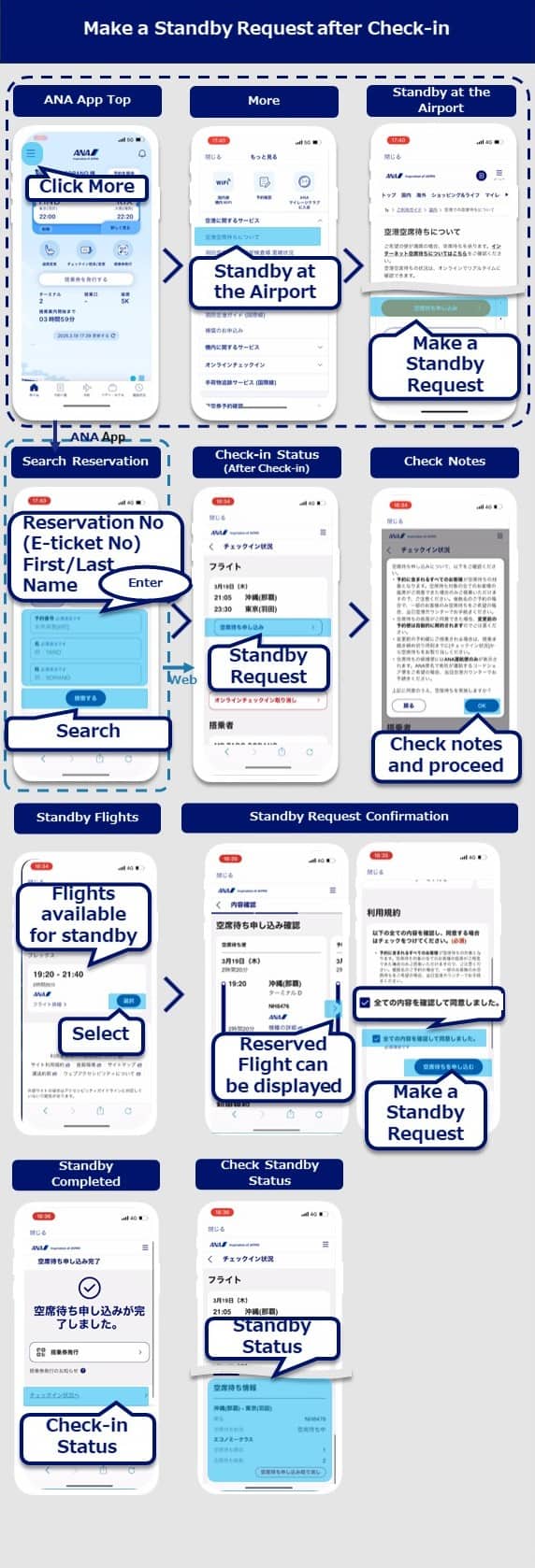
Standby after check-in
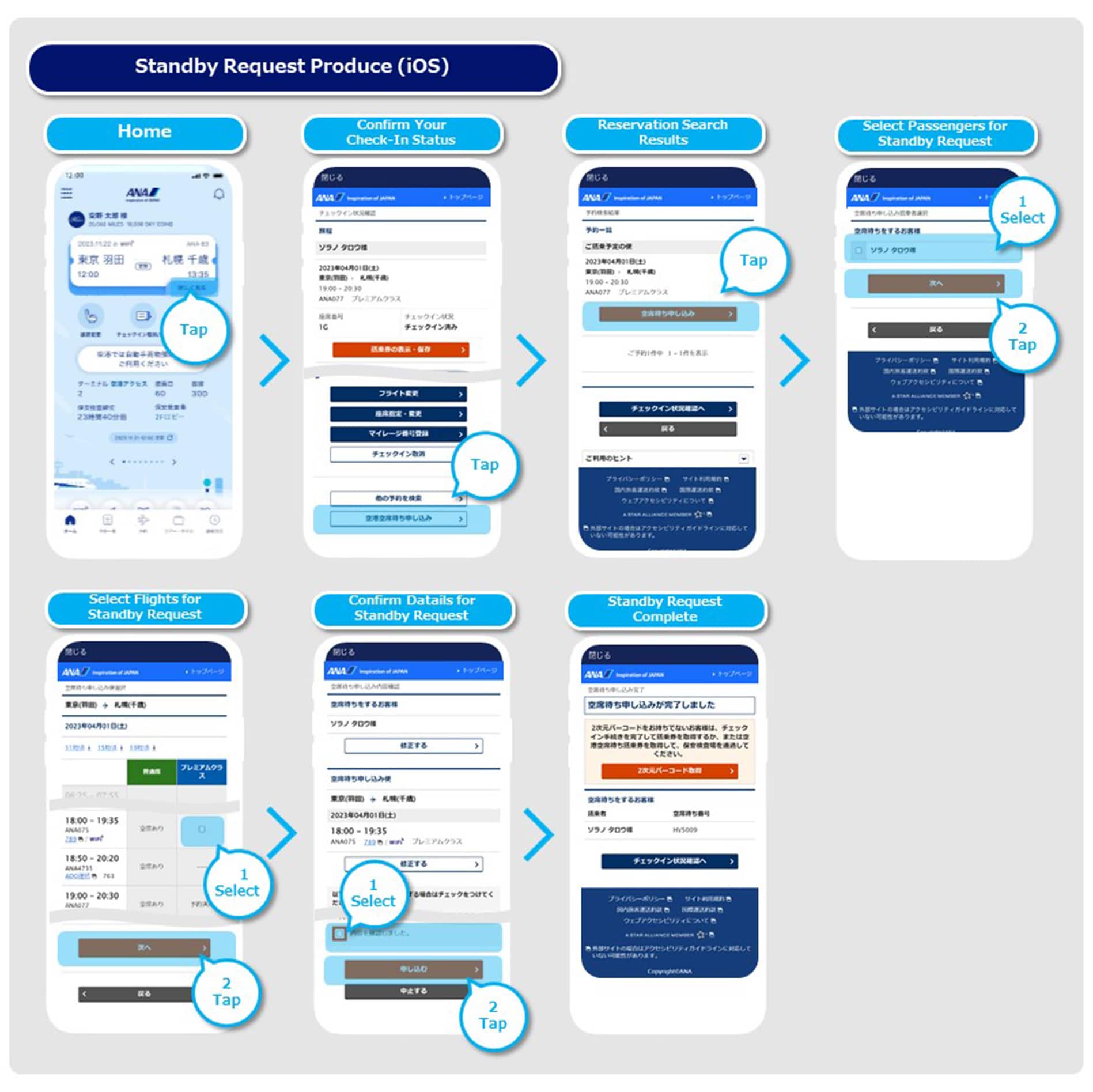
Select "More" on the left corner on the ANA App TOP screen.
Select "Standby at the Airport" under "Airport Services".
Select "Make a Standby Request" from the "Standby at the Airport" page.
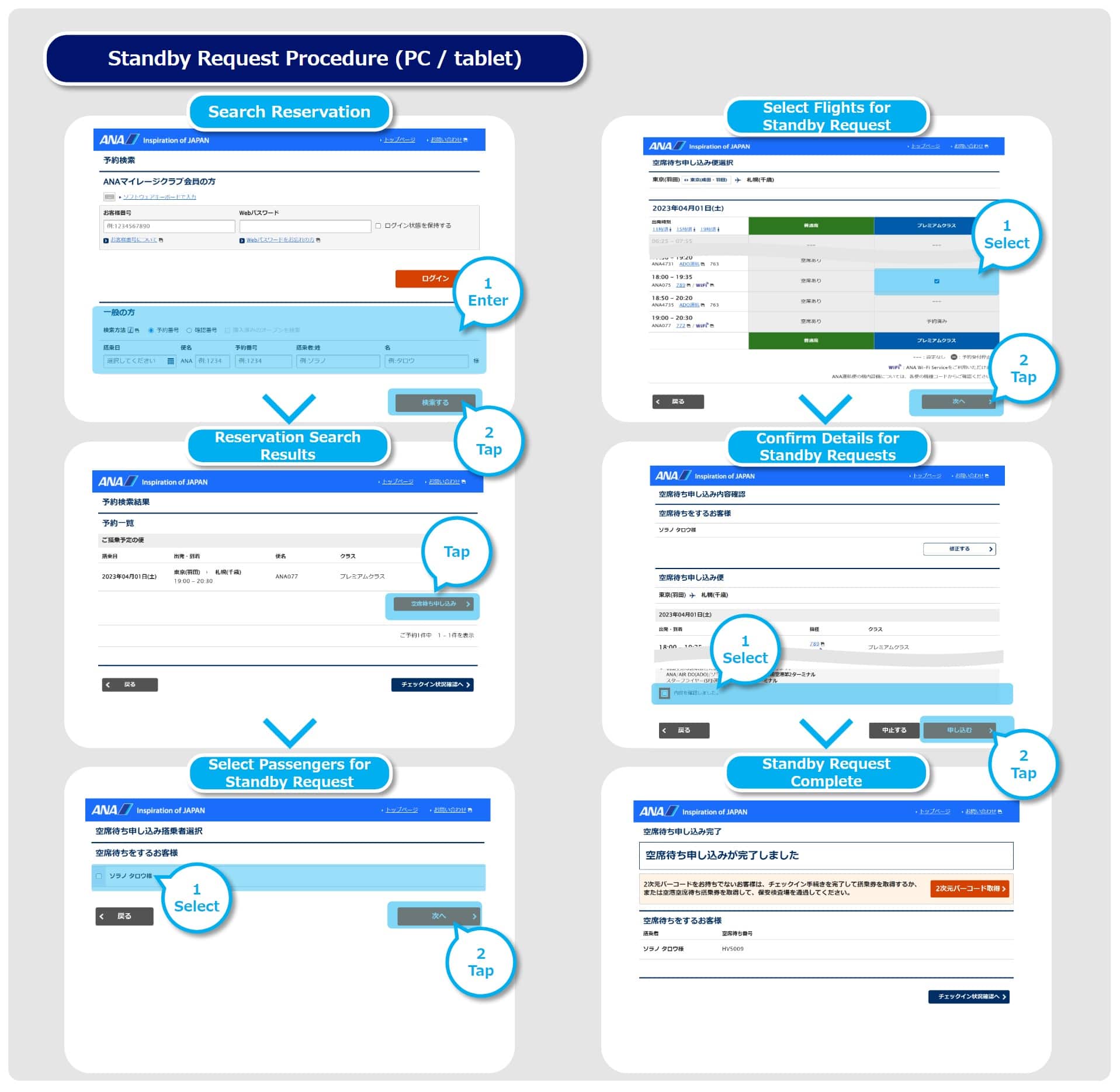
Enter your "Reservation Number" or "e-Ticket Number" and "Name" and select "Search"
Select "Make a Standby Request" on the "Check-in Status" screen.
Check the notes and select "OK".
Select the flight to standby on the "Search Results for Standby" screen. Only flights available for standby will be displayed.
Check your standby flight information and the terms and conditions on the "Standby Request Confirmation" screen. Check the terms and conditions and select "Make a standby Request".
Your standby request is completed
Select "Go to Check-in Status", your standby request information is displayed on the "Check-in Status" screen.
You can check the status of your standby at the airport requests in real time online.
You can only make a standby request if the following conditions are met.
You can only make a request one flight at a time (requests cannot be made for multiple flights at the same time)
You can make a standby request only within the same class
The flight must depart from the same terminal at the same airport on the same departure date as your reserved flight. (You cannot change the departure or arrival airports.)
Same conditions apply for cancellations and delays caused by bad weather. (i.e, You cannot make a standby request if you do not have a reservation for the same day.)
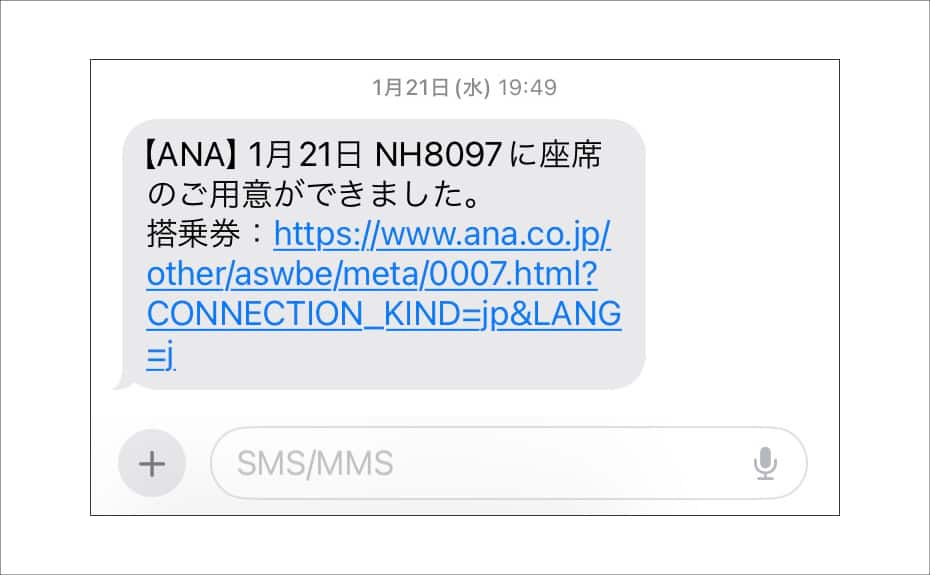
If a seat becomes available, you will be notified via the following means sometime from 20 minutes prior to the flight's departure: Push notification from the app, email, SMS (text message), and the digital sign.
iOS
Android
SMS
The digital sign can be found at a designated information area past the security checkpoint, and displays part of the names of passengers for whom seats have been confirmed for each flight.
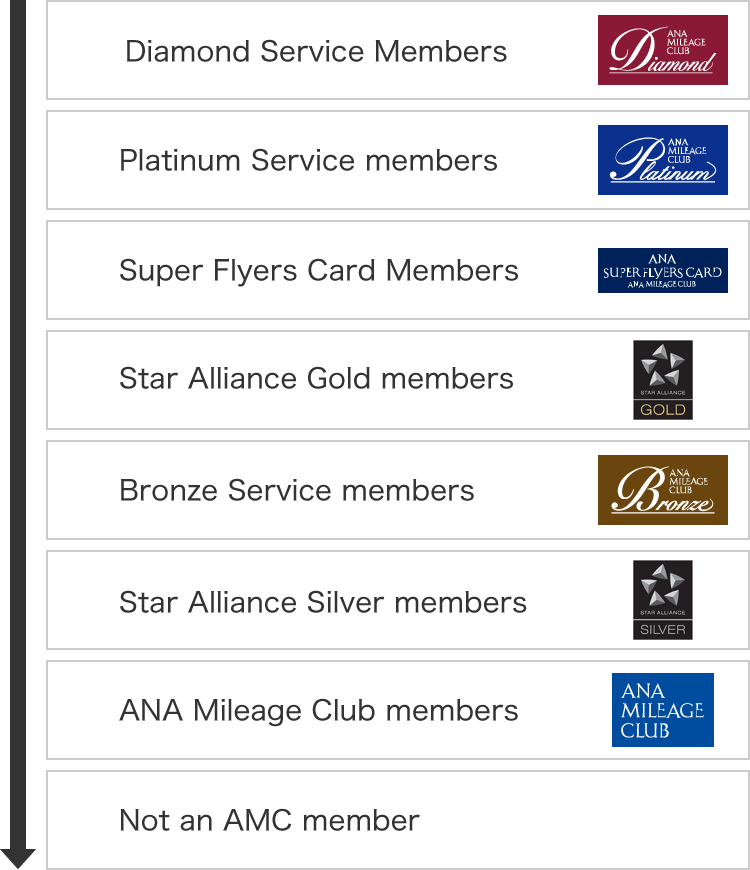
Standby passengers are called in the following order of status.
Please note that the order of seat confimartion among passengers with the same status will be determined based on the fare type of the flight ticket for which the standby request was made.
Diamond Service Members
Platinum Service members
Super Flyers Card Members
Star Alliance Gold members
Bronze Service members
Star Alliance Silver members
ANA Mileage Club members
Not an AMC member
If you are able to receive notifications online, you do not need to go anywhere to complete procedures.
When a seat becomes available, receive a new boarding pass on your device from your notification, and board the flight.
If you are checking the digital sign or are unable to obtain your boarding pass, please go to the designated information area.
If you wish to check in baggage, please inform a member of staff.
You will need to board your reserved flight or, if you are continuing the standby, make another request.
Please note that once a seat becomes available, your original flight will be automatically canceled.
Passengers are informed of standby request outcomes in the gate area past security at all airports.
Depending on the flight status, the time and location where passengers are informed of their standby request status may change.
Passengers whose flights have been canceled may be notified before other passengers.
Standby requests may be unavailable or partially restricted for certain customers.
In addition to the below, there may be cases in which standby on web is not available depending on the completion status of procedures.
"〇" indicates requests can be made for the service; and "×" indicates requests cannot be made.
| Case | Request Online | Request at an Airport Counter |
|---|---|---|
| Passengers whose fares do not allow airport standby | × | × |
| Standby for flights departing from/arriving at an airport different from your reserved flight | × | × |
| Standby for flights departing from a different terminal from your reserved flight | × | × |
| Passengers who purchased their ticket via a travel agency | × | 〇 |
| Group passengers | × | × |
| Passengers with reservations that include international flights | × | 〇 |
| Passengers requiring special assistance | 〇*1 | 〇 |
| Passengers with Cabin Baggage Fees or who have purchased an extra seat | × | × |
| Standby Requests for Select Passengers on a Multi-Party Reservation | × | 〇 |
| Standby from Economy Class to Premium Class on a reserved flight | 〇*2 | 〇 |
Boarding passes are issued at the airport counter.
From May 19 to June 9, 2026 (planned), the Japan domestic and international passenger service systems will be integrated to a new system by airport. During this system migration period, some airports will be operating on the pre-integration system while others will have migrated to the new system. As a result, there will be a restriction in making upgrade standby requests. Please check Service Limitations During System Migration Period in advance.
1
2
3
4
5
6
7
8
9
0
a
b
c
d
e
f
g
h
i
j
k
l
m
n
o
p
q
r
s
t
u
v
w
x
y
z
A
B
C
D
E
F
G
H
I
J
K
L
M
N
O
P
Q
R
S
T
U
V
W
X
Y
Z
All clear
Delete one character
By checking the Keep Me Logged In box on the login screen, you will not need to re-enter your membership number or password for subsequent logins.
The confirmation screen will reappear after closing all browser windows even if you checked "Do not show this screen again."
Please select the pictograms/numbers you received in the one-time password sent to
XXXXXXXxxx@gmail.com. They can be selected in any order.
Please do not close this window when checking your email.
If you have not received your one-time password
If you do not receive an email, please check your email receipt settings
and then have it re-sent.
If you do not do anything on the screen for a certain amount of time, you will have to request another one-time password.
If you do not receive an email, please check your email receipt settings
and then have it re-sent.
The confirmation screen will reappear after closing all browser windows even if you checked "Do not show this screen again."

ANA Biz is a business travel arrangement service.
MILES
ANA SKY COINS
Premium Point / Point on ANA /